
Providing excellent customer support is more than answering questions; it’s about solving problems quickly, clearly, and consistently. That’s where decision tree templates for customer support come in. A decision tree works like a visual roadmap, guiding agents or customers step by step toward the right solution.
Whether it’s billing errors, login issues, or delivery delays, decision tree templates simplify complex processes, reduce errors, and help agents deliver clear, consistent solutions faster and with less stress.
What is a Decision Tree?
A decision tree is a simple diagram that shows you how to make choices step by step. It looks like a tree turned upside down. You start from the “root” at the top (the main question or problem), and from there, you follow the branches (possible answers or actions) until you reach the leaves (final results or solutions).
Let’s take it like this:
- At the beginning, you have one question, such as “What issue is the customer facing?”
- From that question, the tree splits into different branches. For example, one branch might say “Billing problem,” while another might say “Login issue.”
- Each of those branches then splits into smaller steps that lead you toward the right solution.

Decision Tree Symbols and Meaning
Like any flowchart, decision trees use standard shapes and symbols to make them easy to read. Understanding these symbols will help you design and follow decision trees more effectively.
1. Rectangle (Process or Action)
- Represents a step where an action needs to be taken.
- Example: “Reset the customer’s password.”
2. Diamond (Decision Point)
- Represents a question that leads to different outcomes.
- Usually has “Yes/No” or multiple-choice paths.
- Example: “Did the payment go through successfully?”
3. Circle (Connector or Continuation)
- Used when a flowchart or decision tree is too big to fit in one place. The circle shows that the process continues somewhere else.
- Example: If the arrow ends at a circle labeled “A”, look for another circle labeled “A” on the next page; that’s where the flow continues.
4. Oval (Start/End Point)
- Shows where the tree begins or ends.
- Example: Start → Customer contacts support | End → Issue resolved.
5. Arrows (Flow Direction)
- Indicate the path to follow based on the outcome of a decision.
- Example: From the diamond, “Is the product under warranty?” → arrow “Yes” → “Offer replacement.”
Why Symbols Matter
- They keep decision trees simple and universally understandable.
- They reduce confusion when multiple people are using or updating the same tree.
- They make the diagram look professional and easier to navigate.
What is a Decision Tree Template?
A decision tree template is a ready-made framework that helps you design and organize decision trees quickly. Instead of starting from a blank page, a template gives you a structured layout with standard shapes, symbols, and flow paths already in place. All you need to do is fill in your own questions, choices, and solutions.
In customer support, this means you can take a template and customize it with the most common issues your team faces, such as billing problems, login errors, or delivery questions. The template acts as a blueprint, guiding you to map out each step clearly and consistently.
It ensures the structure is easy to understand and keeps everyone on your team working with the same format. It’s especially useful when building multiple trees for different support areas, since you can keep them consistent without redesigning from scratch.
When Do You Need a Decision Tree Template
Not every support situation requires a decision tree, but there are clear signs that your team will benefit from one. You’ll know it’s time to use a decision tree template when:
1. Customers Ask the Same Questions Repeatedly
If your agents are handling the same issues, like billing errors, password resets, or shipping delays, a decision tree helps them respond quickly and consistently every time.
2. Support Answers Vary Between Agents
When two agents give different solutions for the same problem, it creates confusion and frustration. A decision tree standardizes the process, ensuring customers always get accurate, consistent answers.
3. Resolution Times Are Too Long
If customers often wait while agents “check with a supervisor” or dig through documents, a decision tree eliminates that delay by guiding them directly to the right next step.
4. New Agents Struggle During Training
Decision trees act as built-in training tools. They give new team members a clear roadmap, helping them handle queries confidently without months of ramp-up time.
5. You Want to Offer Self-Service Options
Decision trees aren’t just for support teams; they can also power chatbots or FAQ systems, helping customers solve simple issues on their own.
In short, you need a decision tree template when your support process feels slow, inconsistent, or overwhelming. It brings order, speed, and clarity to every customer interaction.
Advantages of Using Decision Tree Templates in Customer Support
Using a decision tree in customer support isn’t just about making things look neat; it’s about making the work easier for agents and smoother for customers. Here are the key advantages:
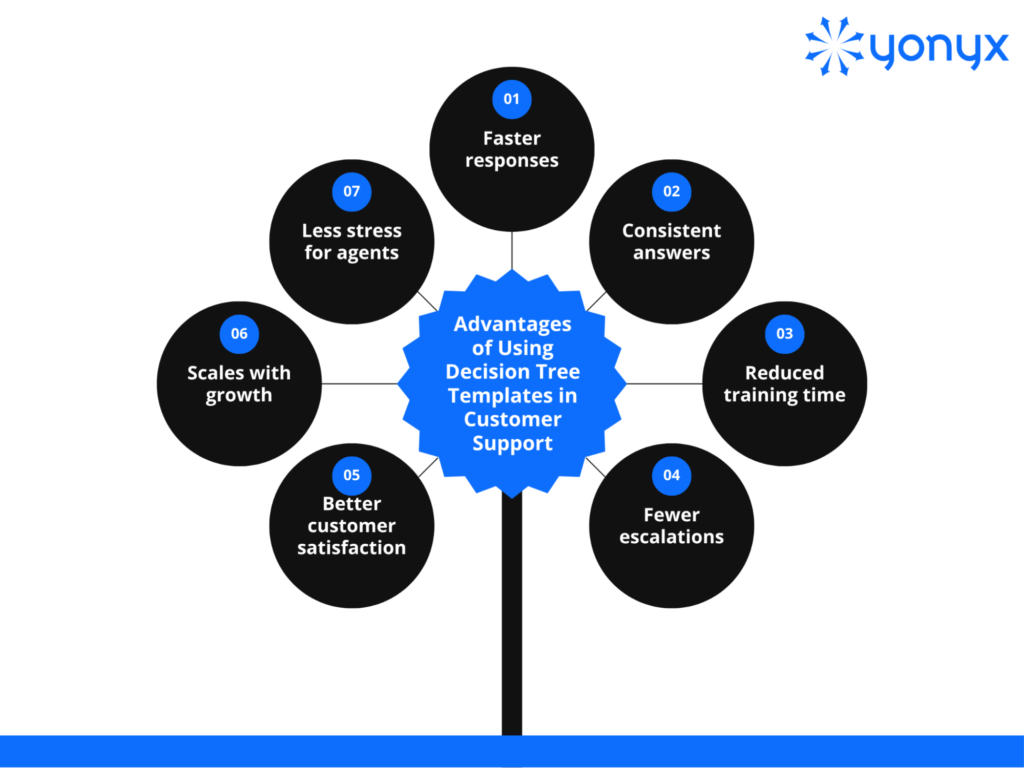
| Key Takeaway: A decision tree template makes support smoother by guiding agents step by step. It speeds up responses, keeps answers consistent, and helps new staff learn faster. Fewer issues need escalation, customers get clear solutions, and teams scale without stress, making both agents and customers happier. |
Decision Trees vs. Call Scripts
At first glance, decision trees and call scripts might seem similar; both guide agents during customer interactions. But in practice, they work very differently and produce very different results.
Call Scripts
- Linear and rigid: Call scripts follow a fixed, one-size-fits-all structure. Agents read or follow the script word for word, regardless of how the conversation flows.
- Limited flexibility: If the customer asks something unexpected, the script often doesn’t cover it, leaving the agent stuck.
- Feels robotic: Customers may notice when agents sound like they’re reading from a script, which can reduce the sense of empathy and personal care.
Decision Trees
- Dynamic and flexible: A decision tree adapts based on the customer’s answers. Agents simply follow the path that matches the situation, making the conversation feel natural.
- Step-by-step problem solving: Each branch leads closer to the right solution, ensuring clarity at every step.
- Personalized experience: Because the path changes with customer input, the conversation feels more tailored and engaging.
- Scalable and updatable: Trees can be updated quickly as products or policies change, keeping the guidance always relevant.
The Key Difference
Call scripts tell agents what to say. Decision trees show agents what to do next.
- Scripts are best for simple, predictable conversations (like a sales pitch).
- Decision trees are best for complex, variable issues (like troubleshooting customer problems).
While scripts can be useful in certain contexts, decision trees provide the flexibility, clarity, and adaptability that modern customer support teams need to deliver fast, consistent, and customer-friendly service.
How To Build and Use a Decision Tree Template For Customer Support
Creating a decision tree template may sound complex, but it’s actually a simple process once you break it into steps. The goal is to turn your customer support workflows into a clear, visual guide that anyone on your team can follow.
1. Identify Common Customer Issues
Start by listing the problems customers contact your team about most often. Examples include payment issues, account login troubles, order delays, or refund requests. These frequent queries will form the foundation of your decision tree.
Example: Customers frequently contact you about billing errors, password resets, delivery delays, and refund requests. These will form the base of your tree.
2. Define the Starting Point
Every decision tree begins with a main question or “root.” For customer support, this could be: “What is the customer’s issue?” From this point, your tree will branch into categories like “Billing,” “Technical,” or “Orders.”
Example: Every decision tree starts with a main question like “What is the customer’s issue?” From there, it branches into clear categories based on the problem type.
3. Map Out the Branches
For each category, add follow-up questions that guide the agent step by step.
For example:
- Billing issue → Is it about an incorrect charge?
- Login issue → Has the customer tried resetting the password?
- Delivery issue → “Is the package marked as delivered?”
Each branch should guide the agent closer to a resolution.
4. Add Clear Outcomes (The Leaves)
The “leaves” of your tree are the final steps or solutions.
For example:
- Incorrect charge → Initiate refund process.
- Password reset didn’t work → Escalate to technical support.
This ensures every branch ends with a clear action, not just another question.
5. Keep It Simple and Easy to Follow
Avoid overloading the tree with too many branches. Decision trees work best when they’re simple. Break down large or complex problems into smaller trees if needed.
Example: Instead of one giant tree for all issues, create separate trees: one for Billing, one for Login, and one for Delivery. This keeps the flow quick and clean.
6. Test It With Your Team
Before rolling it out, let agents test the tree with real or sample queries. Ask them:
- Did the tree save time?
- Were the steps clear?
- Did they feel confident using it?
Refine the structure based on their feedback.
Example: Ask a new agent to use the login tree on a sample call. If they get stuck or have to ask a manager, you know where the tree needs more detail.
7. Integrate Into Your Support Tools
Once finalized, make the tree easy to access.
Options include:
- Embedding it in your helpdesk software.
- Using it inside a knowledge base.
- Powering a chatbot or FAQ system so customers can follow it themselves.
8. Update Regularly
Customer queries evolve as your business grows. A decision tree should not be a “set it and forget it” tool. Schedule regular reviews to add new issues, update outdated solutions, and remove unnecessary branches.
Example: If your company launches a new payment method, add a new branch under Billing issues so agents can guide customers through problems with that payment option.
Tools and Formats for Making Decision Trees
Decision trees are powerful, but they only make an impact when put into action. Now comes the real question: how do you actually build one? Luckily, there are ready-to-use tools that simplify the process and save you time.
1. Helpdesk Platforms (Zendesk, Freshdesk, Salesforce Service Cloud)
Many modern helpdesk platforms come with built-in features or add-ons for decision trees.
- How they help: Agents can access the tree directly within their ticketing system. This keeps everything in one place and avoids switching between tools during live support.
- Best for: Teams that already use these platforms and want seamless integration.
- Example: An agent handling a “payment failed” ticket in Zendesk can follow a pre-built decision tree right inside the system to troubleshoot step by step.
2. Diagramming Tools (Lucidchart, Miro, Draw.io)
These tools allow you to design and visualize decision trees in a clean, professional way.
- How they help: They’re flexible and visual, making it easy to design, edit, and share trees across teams.
- Best for: Teams that want to create custom, detailed trees and then embed or export them into other systems.
- Example: A customer success manager uses Miro to map out a decision tree for refund requests, then shares it with the support team for feedback before implementation.
3. Chatbots and Knowledge Bases (Intercom, Drift, Zoho, Helpjuice)
Decision trees can also power customer-facing self-service tools.
- How they help: Customers answer simple questions, and the chatbot guides them through a decision tree to solve their problem without needing an agent.
- Best for: Businesses that want to reduce ticket volume by encouraging self-service.
- Example: A chatbot asks, “Are you having trouble logging in?” → “Have you tried resetting your password?” → “Here’s a reset link.” If the issue remains unresolved, it escalates to a live agent.
4. Spreadsheets or Documents (Google Sheets, Excel, Word)
For small teams or early stages, even a spreadsheet or document can serve as a basic decision tree.
- How they help: They’re simple, cost-effective, and easy to update.
- Best for: Small businesses or startups testing decision trees before investing in advanced tools.
- Example: A Google Sheet lists common customer issues with “Yes/No” steps in columns, acting as a quick reference guide for agents.
5. Specialized Decision Tree Software (Zingtree, InRule, Decision Rules)
These platforms are built specifically for creating interactive decision trees.
- How they help: They allow you to create clickable, interactive flows that can be used by agents or embedded in websites. Many also provide analytics to track usage.
- Best for: Larger teams or companies that want advanced customization and reporting.
- Example: A company uses Zingtree to create an interactive refund process where customers can follow steps online without contacting support.
Wrapping Up: The Value of Decision Tree Templates
Decision tree templates make customer support faster, clearer, and more consistent. They guide agents step by step, cut down on errors, and help customers solve problems on their own. Unlike scripts, they adapt to real situations and keep conversations natural.
With the right setup, teams can train new agents faster, reduce escalations, and handle growing support needs without stress. Most importantly, customers get quick, reliable answers that build trust. By using decision tree templates, support teams create smoother experiences for both agents and customers, turning every interaction into an opportunity to improve satisfaction and loyalty.
FAQs on Decision Tree Templates For Customer Support
1. Is there a decision tree template in Word?
To create a decision tree in Microsoft Word, go to the Insert tab, select SmartArt, choose Hierarchy, and then select a tree diagram option to begin. You can add or remove text and shapes to customize your tree, or for a more robust solution, consider using Word’s Lucidchart integration or a dedicated diagramming tool like Visio.
2. What is an example of a customer decision tree?
One possible captured customer decision path for the Baby Diaper Shopper from the top down goes like this: “Diaper for Baby” → Type: Pants → Size: Small → Brand: Mamypoko → Final Product: X 40 Pcs. The basic elements of the CDT are simple.
3. What four things must a customer do when making a decision?
They should be able to understand the information, remember it long enough to decide, weigh their options, and clearly communicate their choice, by speaking, signing, or simple gestures like blinking or squeezing a hand.
4. What are the 5 steps of the customer decision-making process?
The consumer decision-making process involves five basic steps. This is the process by which consumers evaluate when to make a purchasing decision. The 5 steps are problem recognition, information search, alternatives evaluation, purchase decision, and post-purchase evaluation.
5. Is there a decision tree template in PowerPoint?
A decision tree PowerPoint template is a pre-created, editable tree structure in PowerPoint that you can edit and populate with your own decision paths. The template provides means to add or remove decision branches as well as more question joints.