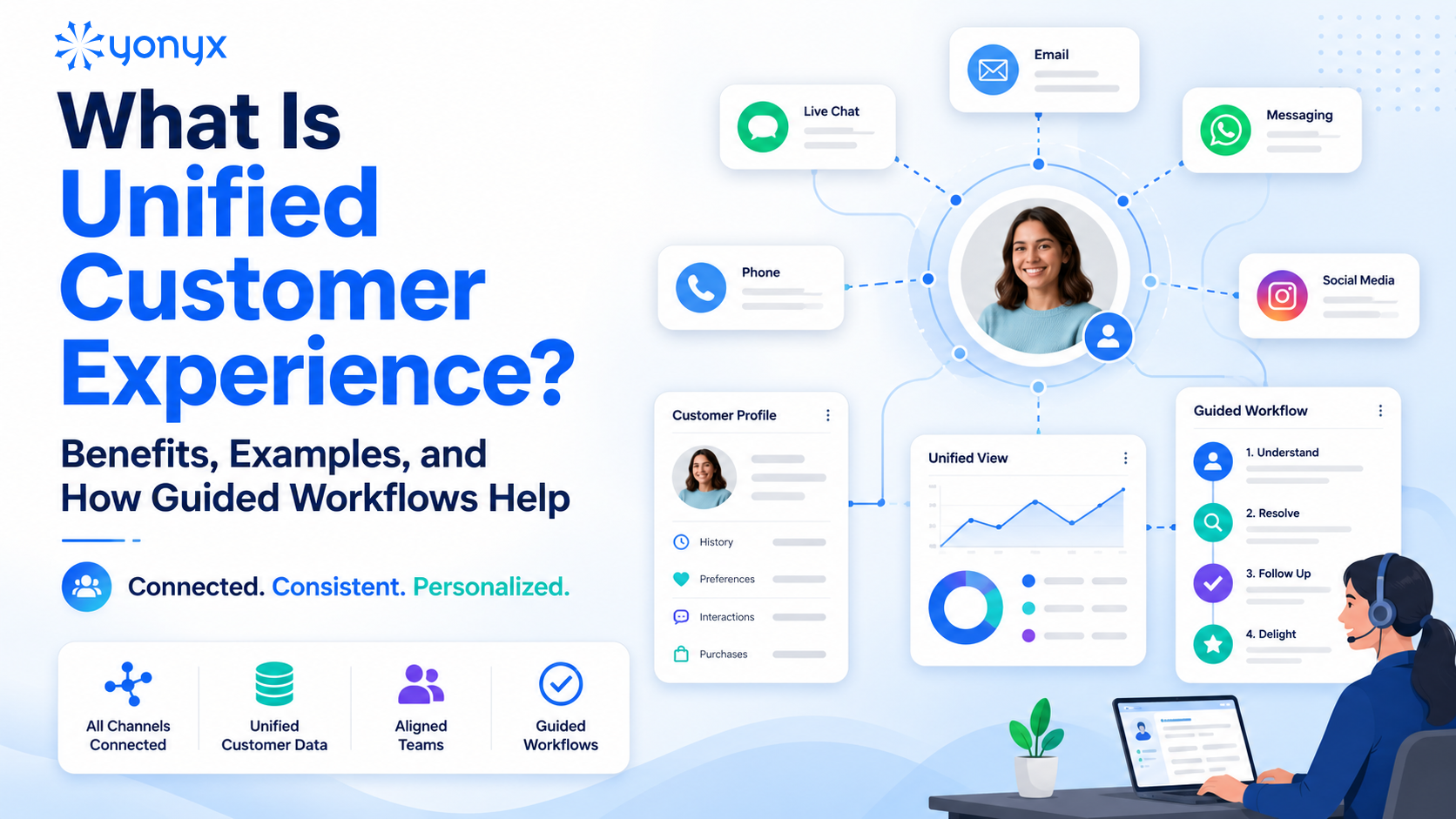
Customers no longer follow a straight path from discovery to purchase to support. They may see a product on social media, browse it on a website, ask a question through live chat, buy it in-store, and later request help by phone or email. If those channels are disconnected, the experience feels broken.
A unified customer experience solves this problem by connecting customer data, communication channels, teams, and workflows. It helps businesses deliver consistent, personalized, and seamless interactions across every touchpoint.
For customers, this means less repetition and faster answers. For businesses, it means better loyalty, higher efficiency, and stronger revenue growth.
The question is no longer whether customers use multiple channels; it’s whether your business can connect those channels into one effortless experience.
What Is Unified Customer Experience?
A unified customer experience, also called unified CX, is an operational strategy that makes every customer interaction feel connected, regardless of channel or department.
In a unified CX model, customers do not feel like they are dealing with separate teams. They feel like they are interacting with one brand that knows their history, understands their needs, and can help them quickly.
For example, a customer may start a conversation on social media, continue it by email, and finish it over the phone. With unified CX, the support agent already sees the full conversation history, purchase details, account information, and previous issues. The customer does not need to repeat everything.
That is the core value of unified customer experience: context follows the customer everywhere.
Unified vs Traditional Customer Experience
Traditional customer experience often depends on disconnected tools and siloed teams. Marketing, sales, support, and operations may each have separate systems and partial customer data.
Unified customer experience connects those systems so everyone works from the same customer view.
| Unified CX | Traditional CX |
| Channels are connected | Channels operate separately |
| Teams share customer context | Teams work in silos |
| Context carries across channels | Customers repeat information |
| Data is centralized | Data is fragmented |
| Service becomes proactive | Service is reactive |
Unified CX is not only about offering multiple channels. That is omnichannel support. Unified CX goes further by connecting the data, processes, workflows, and teams behind those channels.
Why Unified Customer Experience Matters Now
Customer expectations have changed. People expect fast, accurate, and personalized service across every interaction.
If a customer shares information in one channel, they expect the brand to remember it in another. If they report an issue, they expect the next agent to know what already happened. If a delivery is delayed, they expect proactive communication before they need to complain.
Disconnected experiences create friction. Customers may receive inconsistent answers, repeat the same details, wait longer for help, or abandon a purchase altogether.
Unified customer experience matters because it helps brands meet modern expectations while improving internal efficiency. Teams can access accurate customer data, resolve issues faster, and deliver more consistent service.
Core Components of a Unified Customer Experience
A strong unified CX strategy depends on four key components.
1. Unified Data Layer
The foundation of unified CX is connected data.
A unified data layer brings together information from CRM systems, e-commerce platforms, support tools, marketing platforms, billing systems, loyalty programs, and offline transactions.
This creates a single customer view that may include:
- Contact details
- Purchase history
- Support history
- Communication preferences
- Marketing engagement
- Loyalty status
- Complaints or escalations
- Sentiment signals
Identity resolution is also important. It helps match the same customer across different email addresses, devices, phone numbers, and profiles.
Without unified data, teams only see part of the customer journey. With it, they can provide faster, more relevant, and more personalized support.
2. Omnichannel Orchestration
Omnichannel orchestration connects customer communication across chat, email, phone, SMS, social media, messaging apps, and in-person service.
The goal is simple: customers should be able to move between channels without losing context.
For example, if a customer starts with a chatbot and escalates to a live agent, the agent should see the chatbot conversation, the customer’s account, and the reason for escalation.
This reduces repetition, improves resolution speed, and creates a smoother customer journey.
3. Intelligent Automation and AI
AI and automation help businesses deliver unified CX at scale.
Common use cases include:
- Chatbots for routine questions
- Automated case routing
- Sentiment analysis
- Next-best-action recommendations
- Proactive delivery or billing alerts
- Automated follow-up messages
AI can help identify frustrated customers, suggest relevant offers, detect churn risk, and guide agents toward the best response.
The goal is not to replace human support completely. The goal is to help teams respond faster, personalize better, and focus human attention where it matters most.
4. Cross-Functional Alignment
Unified CX is not only a technology project. It also requires cultural and operational alignment.
Marketing, sales, support, product, and operations teams need shared access to customer data and shared goals. Instead of optimizing only for departmental metrics, teams should align around customer-centered outcomes such as retention, customer satisfaction, customer lifetime value, and first contact resolution.
When teams work from the same information, customers receive more consistent answers and better service.
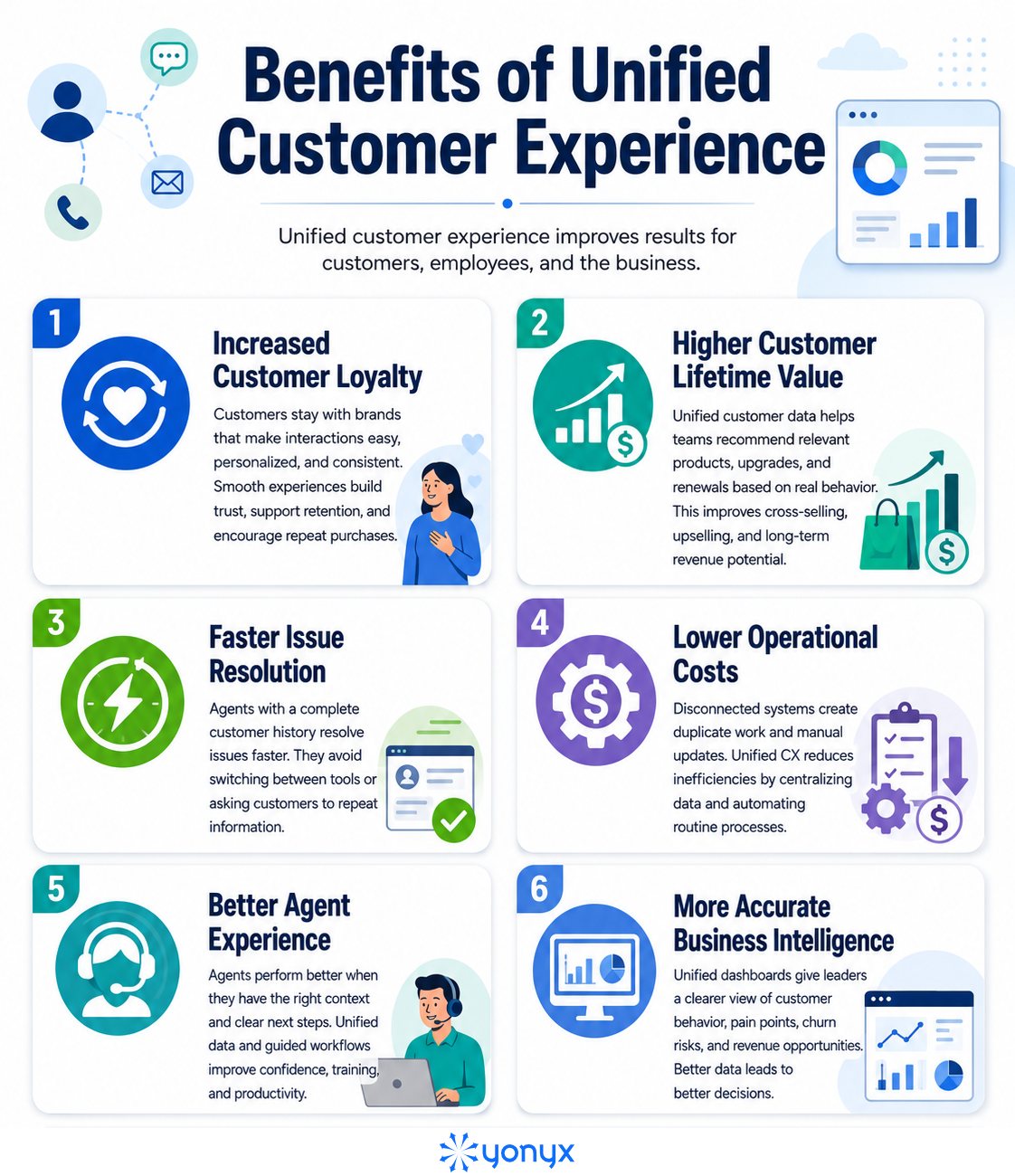
Benefits of Unified Customer Experience
Examples of Unified Customer Experience
Retail: Omnichannel Return and Exchange
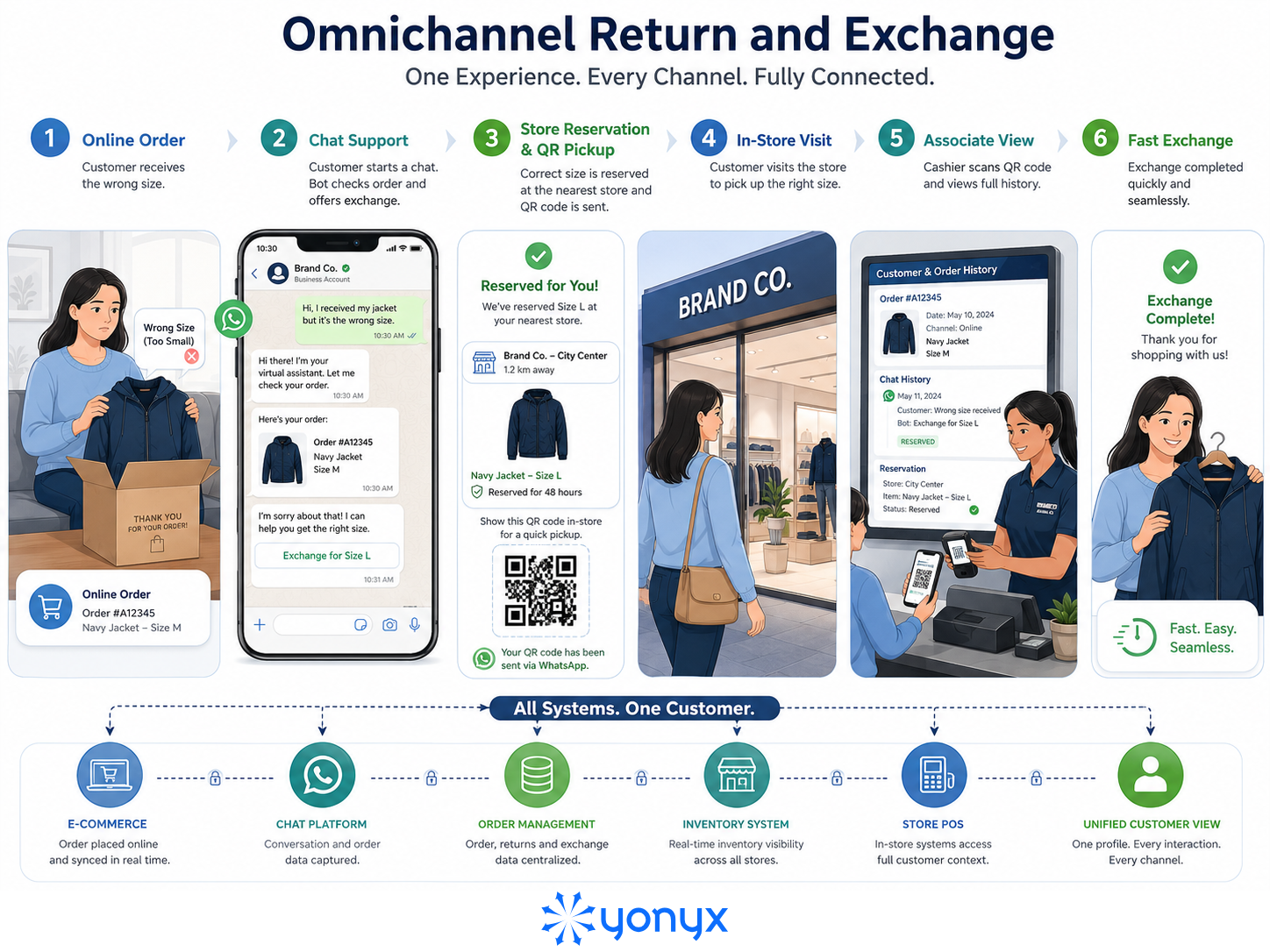
A customer buys a jacket online, but it arrives in the wrong size. They start a WhatsApp chat with the retailer. The bot finds the order, checks available inventory, and offers an exchange.
The customer chooses an in-store swap. The system reserves the correct size at the nearest store and sends a QR code. When the customer arrives, the cashier scans the code and sees the full order and chat history.
The result is fast, connected, and frustration-free.
Banking: Seamless Fraud Resolution
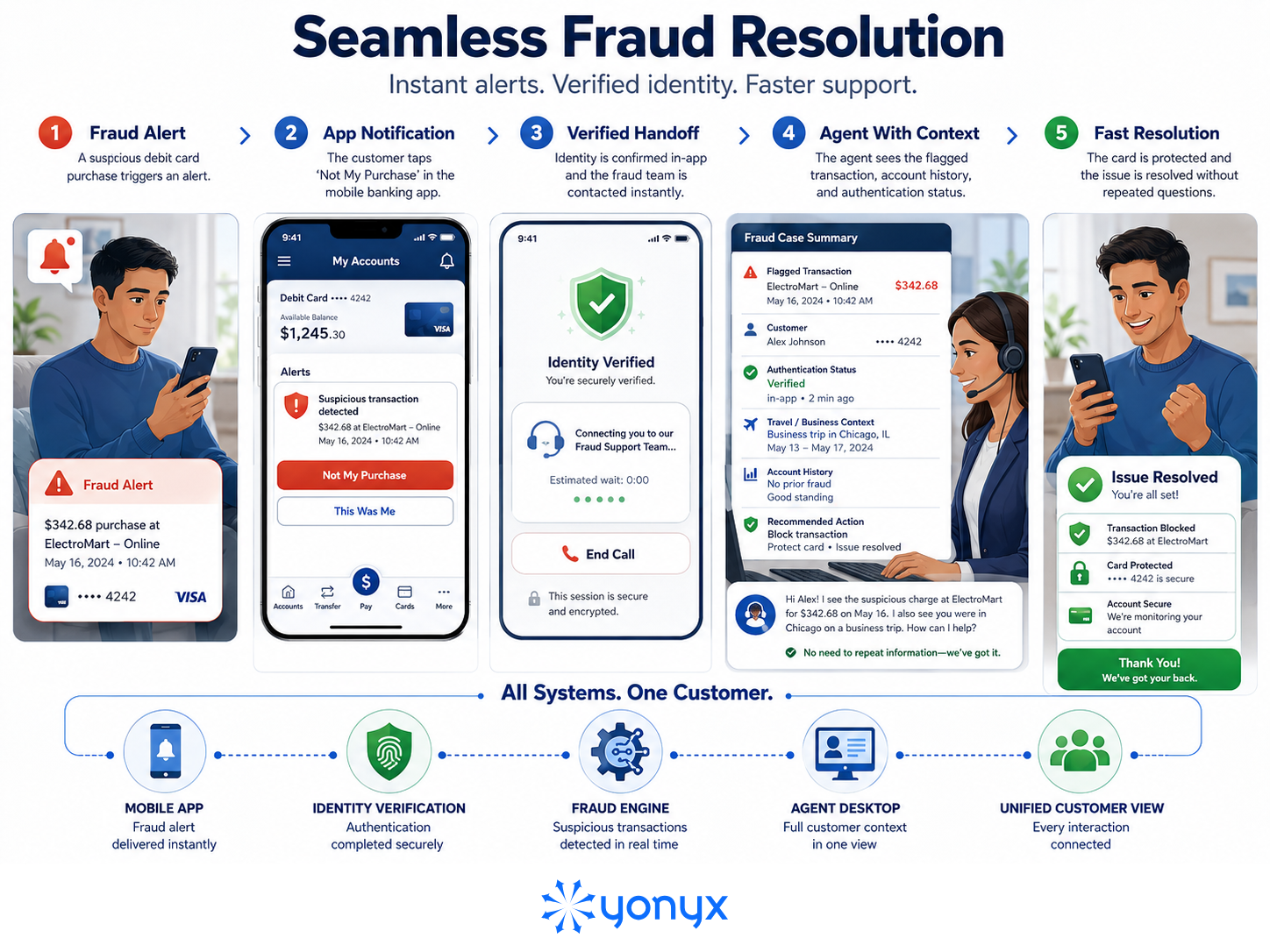
A customer receives a fraud alert while traveling. They tap “Not My Purchase” in the mobile banking app. The app verifies their identity and connects them to the fraud team.
The agent already sees the flagged transaction, verification status, account history, and travel context. The issue was resolved quickly without forcing the customer through unnecessary repetition.
Travel: Proactive Flight Disruption Support
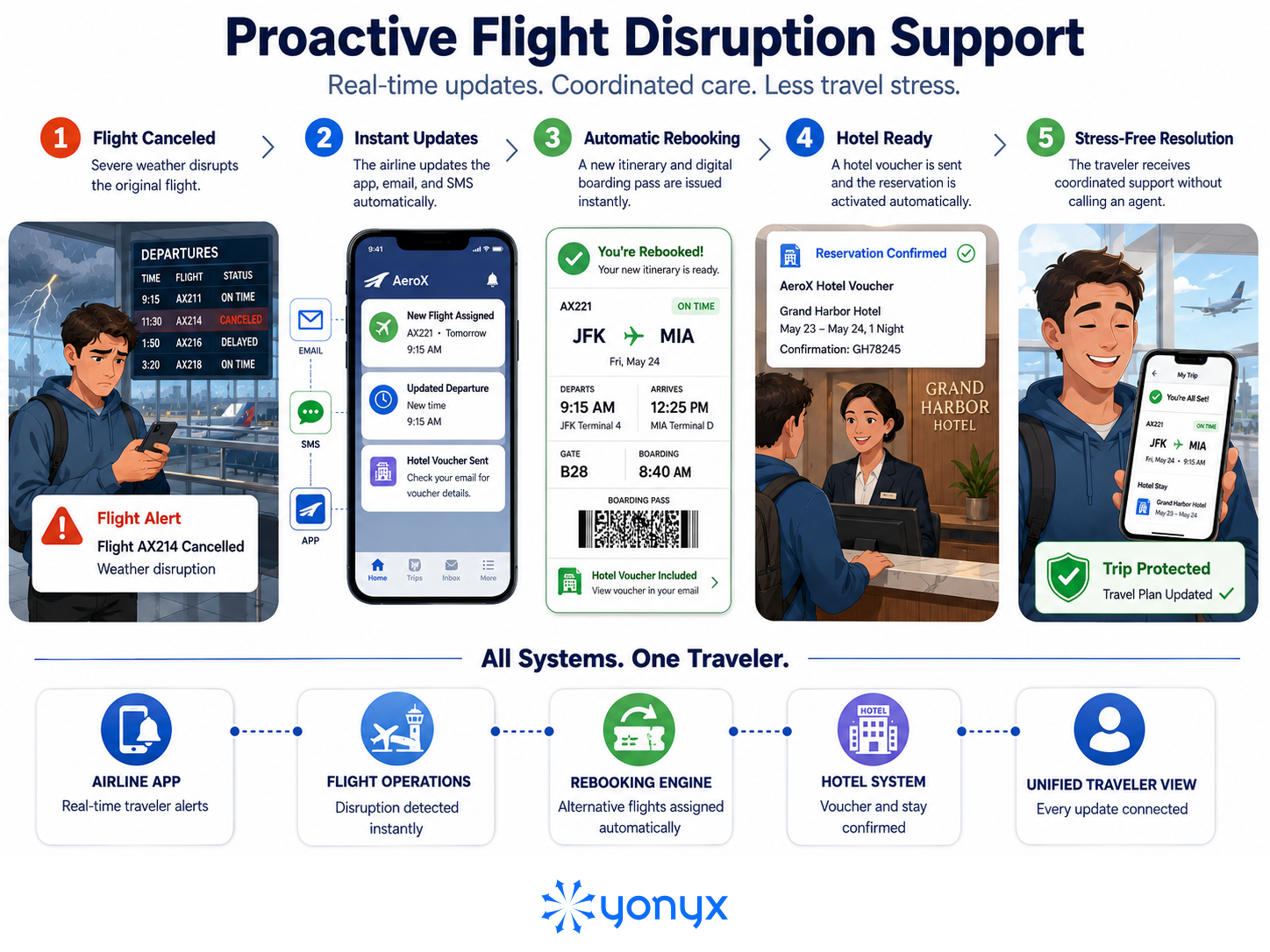
A flight is canceled because of severe weather. Instead of making passengers call support, the airline automatically updates the app, emails a new boarding pass, sends a hotel voucher by SMS, and activates the hotel reservation.
This is unified CX because the system coordinates multiple channels, anticipates customer needs, and reduces support demand.
How Guided Workflows Help Deliver Unified Customer Experience
Guided workflows are step-by-step processes that help agents and automated systems handle customer interactions consistently.
They turn unified customer data into clear action.
A simple flow looks like this:
| Customer action → Unified data layer → Guided workflow → Agent or automation → Fast resolution |
Guided workflows help teams deliver faster, more accurate customer service by giving agents clear next steps based on real customer context.
They help by:
- Reducing guesswork: Agents follow dynamic prompts instead of relying on memory or scattered documents.
- Improving decision-making: Workflows can check order status, payment method, return eligibility, loyalty tier, and risk factors before suggesting the next action.
- Supporting compliance: They can include required verification steps, privacy checks, disclaimers, approvals, and audit trails.
- Speeding up onboarding: New agents can handle complex issues faster because the system guides them through each step.
- Creating consistent service: Every customer gets the same quality of support, no matter which agent, team, or channel handles the request.
Conclusion
A unified customer experience connects channels, data, teams, and workflows to deliver seamless, consistent, and personalized interactions. It removes gaps between departments, helping customers get faster, more relevant support without repetition.
Businesses benefit through stronger loyalty, quicker resolutions, lower costs, improved agent productivity, and better insights. Guided workflows make unified CX easier to execute by turning customer context into the right action every time, supporting better service and long-term growth.
FAQs on Unified Customer Experience
1. What is the difference between unified CX and omnichannel CX?
Omnichannel CX connects customer-facing channels to preserve context across touchpoints. Unified CX goes further by integrating backend systems, data, and teams into one platform. While omnichannel improves interaction continuity, Unified CX enables a single customer view, seamless collaboration, and more personalized, organization-wide customer experiences.
2. What tools are needed for a unified customer experience?
Businesses create Unified CX with integrated tech stacks that centralize customer data, connect communication channels, and automate workflows. Key tools include CRMs, CDPs, omnichannel support platforms, AI automation, and journey analytics, giving every team a real-time customer view and enabling faster, more personalized experiences.
3. How do guided workflows improve customer service?
Guided workflows improve customer service by giving agents and customers clear, step-by-step processes. They speed up resolutions, standardize service quality, reduce errors, simplify onboarding, and unify data in one workspace, helping teams deliver faster, more consistent, and personalized support with less manual effort.
4. What is a single customer view in unified CX?
A Single Customer View (SCV) is a centralized 360-degree customer profile that unifies demographic, behavioral, transactional, support, and preference data. It powers Unified CX by breaking down silos, helping teams personalize journeys, reduce repetition, maintain omnichannel continuity, and act from one accurate customer record.
5. What are examples of disconnected customer experience?
A disconnected customer experience occurs when channels, teams, or systems fail to share data. Customers may repeat issues, face conflicting policies, or receive inconsistent information across touchpoints. Examples include transfer loops, online/in-store silos, repeated authentication, and sales teams unaware of recent support complaints.