Choosing the right customer service decision tree software can make support faster, more consistent, and easier to scale. Instead of asking agents to memorize complex processes or search through long help documents, decision tree software gives them guided, step-by-step workflows that lead to the right resolution.
The best tools do more than create simple “yes/no” paths. They help teams build interactive troubleshooting guides, agent scripts, self-service flows, compliance checklists, and billing resolution workflows. They also integrate with CRMs, track performance, and make it easy to update processes as your business changes.
This guide explains the essential features, common use cases, and buyer’s checklist to help you choose the right platform.
What Is Customer Service Decision Tree Software?
Customer service decision tree software is a tool that helps support teams create guided workflows based on customer responses, issue types, account data, or troubleshooting outcomes.
For example, instead of giving an agent a static article about refund eligibility, a decision tree can ask a series of questions:
- “Was the order delivered?”
- “Is the customer within the refund window?”
- “Is the item damaged?”
- “Does the customer qualify for a replacement or refund?”
Based on the answers, the software guides the agent to the correct next step. The same logic can also be published as a self-service experience on a website, chat widget, help center, or mobile app.
Why Customer Service Teams Use Decision Tree Software
Support teams often handle repetitive questions, technical issues, compliance requirements, billing disputes, and escalation decisions. Without a structured process, agents may give inconsistent answers or miss important steps.

Decision tree software helps teams:
- Reduce average handle time
- Improve first-contact resolution
- Shorten agent onboarding
- Standardize support responses
- Deflect repetitive tickets through self-service
- Reduce errors in complex workflows
- Improve compliance and process control
This is especially useful for teams with complex products, high ticket volume, regulated processes, or fast-changing support policies.
4 Key Factors to Evaluate Before Choosing
Before comparing vendors, clarify what problem you need the software to solve. A simple decision tree builder may be enough for basic FAQs, but customer service teams usually need deeper workflow, integration, and reporting capabilities.
1. Define Your Support Pain Points
Start by identifying your biggest operational challenges. Are agents taking too long to resolve tickets? Are new hires struggling to learn workflows? Are customers opening tickets for issues they could solve themselves?
Common goals include reducing training time, improving first-contact resolution, standardizing compliance scripts, and increasing self-service adoption. Your primary goal should shape your buying criteria.
2. Test Your Most Complex Workflows
Do not evaluate software using only a simple “yes/no” flow. Test it with your most complex, real-world support scenario.
For example, choose a workflow involving customer account type, warranty status, billing rules, escalation conditions, and CRM data. This will show whether the tool can support real operational complexity or only basic branching paths.
3. Evaluate Agent and Customer Experience
The software should be easy for both agents and customers to use. Agents need a clean, fast interface that helps them move through guided steps while speaking with customers. Customers need a simple, mobile-friendly experience that does not feel confusing or overwhelming.
Look for clear navigation, searchable workflows, helpful prompts, easy backtracking, and responsive design for mobile users.
4. Check Implementation Speed
Customer service workflows change often. A good decision tree platform should allow support operations teams to build and update flows without waiting on developers.
No-code or low-code tools are especially valuable because they allow faster deployment and easier maintenance.
5. Understand Total Cost of Ownership
Do not compare tools only by monthly subscription price. Check costs for seats, usage, hosting, integrations, implementation, training, support, analytics, and enterprise security. Hidden costs can make a low-cost tool expensive after rollout.
6. Clarify Workflow Ownership
Decide who will build, approve, publish, and maintain the decision trees. Support operations, knowledge management, compliance, and IT may all need different permission levels. A good platform should support clear ownership and approval workflows.
Essential Features Every Decision Tree Software Should Have
No-Code Visual Builder
A no-code visual builder is one of the most important features. It lets non-technical teams create nodes, branches, conditions, and scripts without writing code.
Look for drag-and-drop editing, visual branching, reusable components, easy publishing, and simple content updates. This helps teams launch new workflows quickly and keep existing ones accurate.
CRM and Helpdesk Integrations
Your decision tree software should integrate with the tools your team already uses, such as Zendesk, Salesforce, HubSpot, or a custom CRM.
Strong integrations allow the decision tree to pull customer data, update ticket fields, write notes back to the CRM, and trigger follow-up actions. Bidirectional data syncing is especially important because it reduces duplicate work and keeps support records accurate.
Interactive Agent Guidance
The platform should support dynamic, step-by-step scripts that change based on customer answers. This is useful for troubleshooting, billing, compliance, identity verification, refund decisions, and escalation workflows.
Instead of relying on static scripts, agents can follow guided paths that adapt to the situation.
Omnichannel Deployment
A strong decision tree platform should work across multiple channels, including agent desktops, web pages, help centers, chat, mobile apps, and customer portals.
This allows teams to use the same decision logic for both internal agent support and external self-service.
Analytics and Reporting
Analytics help you improve decision trees over time. The platform should show where users drop off, which paths are used most often, which flows lead to successful resolutions, and where customers or agents get stuck.
Useful reporting includes completion rates, failed resolution points, common answer patterns, average completion time, and self-service success rates.
Version Control and Collaboration
Support workflows often involve sensitive or business-critical processes. Your software should include version history, rollback options, user-level change tracking, draft and published states, and collaboration tools.
This protects your team from accidental edits, broken paths, or deleted workflows.
Rich Media Support
Some issues are easier to solve with images, videos, screenshots, or links. Rich media support is useful for product setup, hardware troubleshooting, software walkthroughs, and visual error identification.
Search Functionality
As your decision tree library grows, agents need to find the right workflow quickly. Strong keyword search helps agents locate trees by product, issue type, error code, or customer problem.
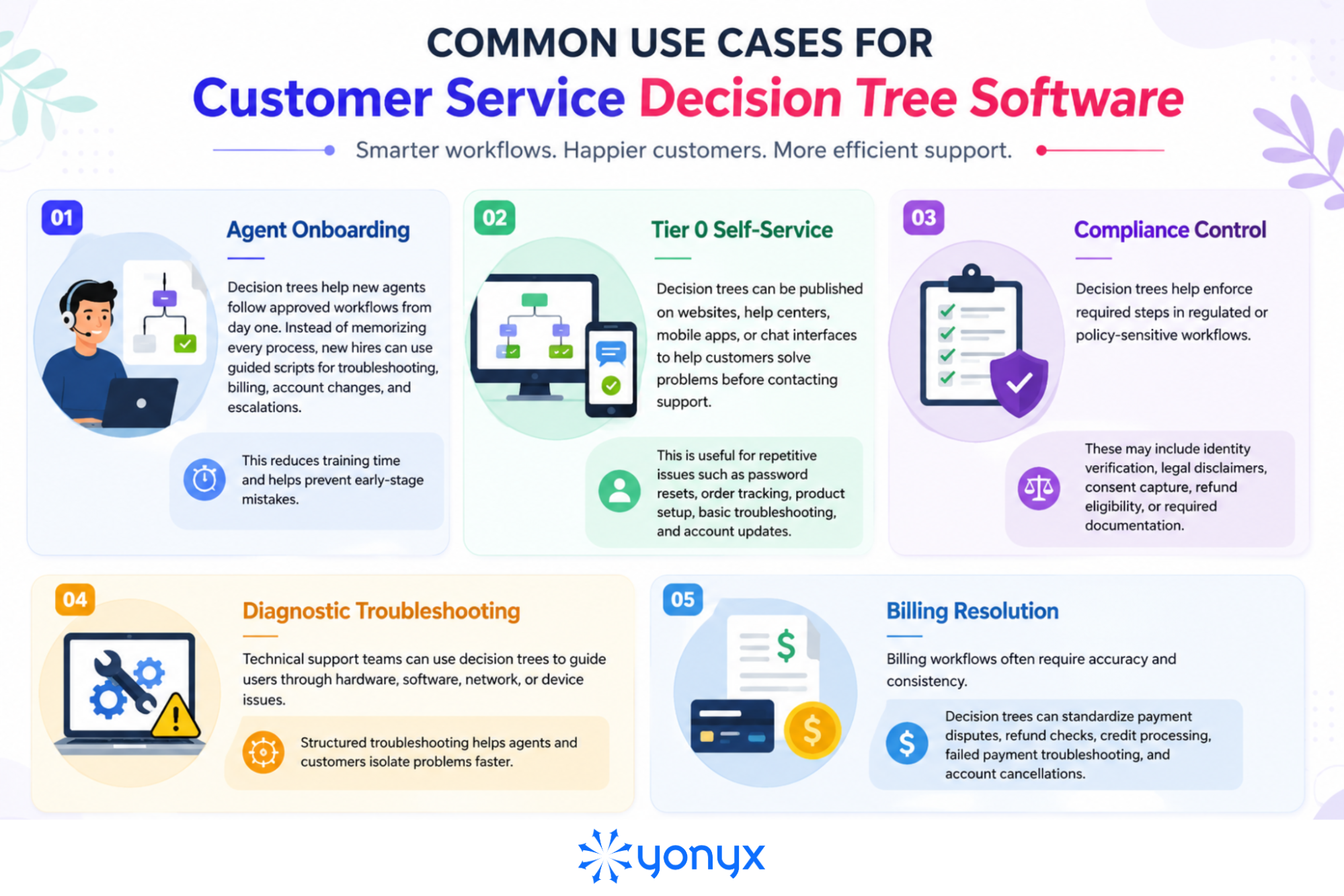
Common Use Cases for Customer Service Decision Tree Software
Once you know what to look for in the right platform, the next step is understanding how customer service teams actually use decision tree software to simplify support, reduce errors, and deliver faster resolutions.
Buyer’s Checklist for Customer Service Decision Tree Software
Use this checklist to quickly compare platforms before choosing a solution.
Usability
- No-code visual builder
- Easy workflow updates for non-technical teams
- Simple agent interface
- Mobile-friendly customer experience
- Support for rich media and search
Integrations
- CRM and helpdesk integration
- Support for Zendesk, Salesforce, HubSpot, or custom systems
- Bidirectional data sync
- APIs and webhooks
- Ability to trigger external workflows
Analytics
- Drop-off tracking
- Common resolution path reports
- Self-service success measurement
- A/B testing support
- Workflow optimization insights
Governance
- Version history
- Rollback options
- User-level change tracking
- Approval workflows
- Bulk node editing
- Multilingual workflow support
Vendor Evaluation
- Seat-based pricing instead of view-based pricing
- No hidden hosting or usage fees
- Migration support for existing content
- PDF and spreadsheet conversion support
- Export options such as JSON or CSV
- Enterprise security standards such as SOC 2 Type II
Final Thoughts
Choosing customer service decision tree software is not just about finding the platform with the longest feature list. It is about choosing a system that can handle the way your support team actually works: complex scenarios, changing policies, multiple channels, agent handoffs, and customer expectations for fast answers.
The right platform should make your hardest workflows easier to build, maintain, measure, and improve. Before making a decision, test each tool against real support scenarios, not just demo flows or marketing claims. If the software can support your most complicated troubleshooting, billing, compliance, or escalation process with clarity and flexibility, it is far more likely to deliver value after rollout.
FAQs on Customer Service Decision Tree Software
1. What is customer service decision tree software?
Customer service decision tree software helps support teams create guided workflows that lead agents or customers through step-by-step troubleshooting, billing, compliance, or support processes.
2. What features should decision tree software have?
Important features include a no-code visual builder, CRM integrations, analytics, omnichannel publishing, version control, rich media support, search functionality, and API access.
3. How does decision tree software help support agents?
It gives agents structured scripts and guided steps so they can resolve issues faster, follow approved processes, and provide more consistent answers.
4. Can decision trees be used for customer self-service?
Yes. Many platforms allow teams to publish decision trees on websites, help centers, mobile apps, or chat interfaces so customers can solve issues without contacting support.
5. What are the biggest red flags when choosing decision tree software?
Major red flags include no API access, static-only paths, hidden usage fees, no bulk editing, poor mobile rendering, no version history, and no export options.