
Building a business case for call center automation software means proving that automation will create measurable business value. Decision-makers need to see how the investment will reduce cost per contact, improve response times, increase agent productivity, protect customer experience, and deliver a clear return on investment.
Here, you will come to know how to build a data-backed business case for call center automation software. You’ll learn which problems to document, which metrics to include, how to calculate ROI, how to align the proposal with stakeholder priorities, and how to present a phased implementation plan executives can approve.
Key Takeaways
- Lead with a clear, direct answer. The blog clearly defines what a business case for call center automation is, why it matters, and what outcomes it should prove. AI Overviews favor content that answers the main query early and plainly.
- Use a step-by-step structure. The post breaks the topic into numbered steps, from identifying problems to defining success metrics. This makes it easier for AI systems to extract process-based answers.
- Include formulas, metrics, and examples. ROI formulas, cost-per-contact calculations, payback period examples, and KPI lists make the content more concrete and citation-worthy for AI summaries.
- Cover related subtopics comprehensively. The blog includes stakeholder priorities, implementation roadmap, risks, software evaluation, templates, and FAQs. This depth helps the page match multiple related AI Overview queries.
- Add scannable sections and FAQ-style answers. The FAQs and tables support quick extraction of concise answers, which is useful for ranking in AI-generated summaries and overview-style results.
What Is a Business Case for Call Center Automation Software?
| Quick Answer: A business case for call center automation software is a proposal that shows why automation is worth the investment. It outlines the current support challenges, expected cost savings, customer experience benefits, implementation costs, risks, and projected ROI. |
A business case for call center automation software is a proposal that explains why the organization should invest in automation. It outlines the current problems, expected benefits, costs, risks, implementation plan, and projected return on investment.
A business case is different from a software comparison. A software comparison helps choose a vendor. A business case explains why the organization should invest at all, what business outcomes the investment should create, and how success will be measured.
The goal is to help stakeholders answer one question:
Will this investment create measurable business value?
For call centers, that value usually comes from five areas:
- Lower cost per contact
- Reduced call and ticket volume for live agents
- Faster response and resolution times
- Better customer satisfaction
- Improved agent productivity and retention
A strong business case does not focus only on software features. It translates those features into financial, operational, and customer experience outcomes.
Step 1: Identify the Current Contact Center Problems
Start by defining the specific problems automation will solve. Avoid generic statements like “we need to improve efficiency.” Use measurable pain points that show why change is necessary.
High Operational Costs
Disclaimer: This cost-per-contact calculation is for estimation purposes only. Actual costs may vary based on staffing, software, overhead, outsourcing, contact channel, and internal accounting methods.
Manual handling of repetitive inquiries increases the cost of running a call center. Common high-volume tasks include password resets, order tracking, appointment updates, billing questions, and basic troubleshooting.
To establish your baseline, calculate your current cost per contact:
Cost per contact = Total operating costs / Total number of contacts
For example, if your monthly operating cost is $120,000 and your contact center handles 20,000 contacts per month, your cost per contact is:
$120,000 / 20,000 = $6 per contact
This number is essential because it helps estimate how much the business can save by shifting routine interactions to automation.
Long Wait Times
Long wait times increase customer frustration and can damage customer satisfaction scores. They also create pressure on agents, especially during peak periods.
Track metrics such as:
- Average speed to answer
- Average handle time
- Abandonment rate
- Queue length
- First-contact resolution rate
These metrics show where automation can reduce friction and improve service speed.
Agent Burnout and Turnover
Agents often spend a large part of their day handling repetitive tasks. This can lead to burnout, lower engagement, and high attrition.
High turnover creates additional costs through recruiting, onboarding, training, and lost productivity. If automation can reduce repetitive work, it can help agents focus on complex, higher-value customer issues.
Poor Customer Experience
Customers expect fast, accurate, and consistent support. Manual processes often create delays, repeated questions, and inconsistent answers across channels.
Automation can improve customer experience by providing instant responses, routing customers to the right place, and transferring context from bots to human agents.
Limited Scalability During Demand Spikes
Many contact centers struggle when call volume increases suddenly due to seasonal demand, product issues, billing cycles, promotions, or service outages. Without automation, the usual response is to add agents, extend shifts, increase overtime, or accept longer wait times.
This creates a scalability problem: support costs rise as volume rises. Call center automation can help by handling routine inquiries, routing urgent issues faster, and allowing teams to manage higher volume without increasing headcount at the same rate.
Step 2: Define Clear Automation Objectives
Once the problems are clear, define what the automation software should achieve. These objectives should be specific, measurable, and tied to business outcomes.
Cost and Efficiency Objectives
- Reduce cost per contact.
- Deflect 20% to 40% of routine inquiries.
- Lower average handle time.
- Reduce after-call work.
- Scale support without proportional headcount growth.
Customer Experience Objectives
- Provide 24/7 support.
- Lower call abandonment rates.
- Improve first-contact resolution.
- Improve CSAT or NPS.
- Reduce customer effort.
Agent Productivity Objectives
- Reduce repetitive work.
- Improve the agent’s focus on complex issues.
- Increase agent capacity.
- Reduce burnout and turnover risk.
The best objectives are linked directly to your current pain points. For example, if your biggest issue is rising call volume, focus on call deflection and self-service resolution. If your biggest issue is agent burnout, focus on workflow automation and after-call work reduction.
Step 3: Calculate the Financial Impact
Financial impact is the core of the business case. Executives need to see how automation affects cost, productivity, and return on investment.
Use a Simple ROI Formula
Disclaimer: ROI and payback estimates are illustrative and should be validated using your organization’s actual operating costs, automation costs, contact volume, labor rates, and finance-approved assumptions.
Use this formula to estimate return on investment:
ROI = [(Total annual benefits – Total annual costs) / Total annual costs] × 100
For example, if automation creates $180,000 in annual savings and costs $90,000 per year, the ROI is: [($180,000 – $90,000) / $90,000] × 100 = 100% ROI
Also, calculate the payback period:
Payback period = Total investment / Monthly savings
If the implementation costs $90,000 and the expected monthly savings are $15,000, the payback period is: $90,000 / $15,000 = 6 months
Estimate Call Deflection Savings
Disclaimer: Call deflection savings depend on actual containment rate, customer adoption, automation accuracy, escalation volume, and the cost difference between live-agent and automated interactions.
Call deflection happens when customers resolve their issue through automation instead of speaking with a live agent.
For example, assume your contact center handles 10,000 monthly calls at $6 per live call.
Your current monthly cost is: 10,000 × $6 = $60,000
If automation deflects 20% of calls to self-service, then 2,000 calls are handled by automation.
If each automated interaction costs $0.50, the new cost is: 2,000 × $0.50 = $1,000
The avoided live-agent cost is: 2,000 × $6 = $12,000
Estimated monthly savings: $12,000 – $1,000 = $11,000
Estimated annual savings: $11,000 × 12 = $132,000
This simple calculation helps stakeholders understand the direct financial value of automation.
Calculate Labor Efficiency Gains
Disclaimer: Labor efficiency gains do not always translate into direct headcount reduction. In many contact centers, time savings create additional capacity, reduce overtime, improve service levels, or allow agents to focus on higher-value work.
Automation also saves time by reducing manual work. This includes tasks such as data entry, ticket tagging, call summaries, customer authentication, and after-call documentation.
Use this formula: Time saved = Current process time – Automated process time
Then multiply the time saved by the number of times the task occurs and the cost of agent time.
For example, if automation saves 2 minutes of after-call work on 8,000 calls per month, the time saved is: 2 minutes × 8,000 calls = 16,000 minutes
That equals 266.7 hours saved per month
If the fully loaded agent cost is $25 per hour, the monthly productivity value is: 266.7 × $25 = $6,667.50
This does not always mean immediate headcount reduction. In many cases, it means agents can handle more complex work without increasing team size.
Include Implementation and Software Costs
Your business case should include the full cost of automation, not just the subscription fee.
Common costs include:
- Software licensing
- Implementation fees
- CRM or helpdesk integrations
- Data migration
- Training
- Internal project time
- Vendor support
- Maintenance
- Change management
This gives stakeholders a realistic view of total investment.
Compare Current State vs Future State
Disclaimer: The projected future-state figures are sample estimates. Replace them with your organization’s actual baseline metrics, vendor pricing, expected automation rate, and implementation costs before using them in an executive business case.
Create a simple comparison between your current operating model and the projected automated model.
Include:
- Current monthly contact volume
- Current cost per contact
- Current live-agent cost
- Expected automation deflection rate
- Expected automated interaction cost
- Estimated monthly savings
- Estimated annual savings
- Payback period
- ROI percentage
This section should make the financial case easy to understand without requiring stakeholders to interpret technical details.
| Metric | Current State | Projected Future State |
| Monthly contact volume | 20,000 | 20,000 |
| Live-agent cost per contact | $6 | $6 |
| Automated cost per contact | N/A | $0.50 |
| Deflection rate | 0% | 25% |
| Monthly live-agent contacts | 20,000 | 15,000 |
| Monthly automated contacts | 0 | 5,000 |
| Estimated monthly savings | N/A | $27,500 |
| Estimated annual savings | N/A | $330,000 |
Show the Cost of Doing Nothing
A strong business case should also explain what happens if the organization does not invest.
The cost of inaction may include:
- Rising support costs
- Longer customer wait times
- Higher agent turnover
- More hiring pressure
- Lower customer satisfaction
- Slower response during demand spikes
- Lower operational flexibility
This helps decision-makers understand that automation is not just an optional improvement. It may be necessary to maintain service quality and cost control.
Step 4: Show the Customer Experience Benefits
Automation should not be positioned only as a cost-cutting tool. It should also improve how customers experience support.
24/7 Availability
AI chatbots, voice bots, and automated workflows can resolve common questions outside business hours. This is valuable for businesses with customers in multiple time zones or industries where support requests happen after standard working hours.
Faster Resolutions
Automation can instantly answer routine questions and route complex issues to the right agent. This reduces wait times and helps customers get faster resolutions.
Less Repetition
Customers often get frustrated when they have to repeat their issue multiple times. Integrated automation can pass customer context, previous answers, and issue details to human agents.
This creates a smoother handoff and reduces friction.
Lower Customer Effort
Automation can reduce customer effort by helping customers complete simple tasks without waiting in a queue or repeating information. For example, a customer may be able to check order status, update an appointment, verify account information, or receive a billing explanation without speaking to an agent.
When automation is integrated with CRM, helpdesk, billing, or order management systems, it can provide faster and more personalized support.
More Consistent Support
Automation helps standardize responses for common questions. This reduces inconsistent answers and improves service quality across channels.
Step 5: Connect Automation to Stakeholder Priorities
A business case is more persuasive when it speaks directly to each decision-maker’s priorities.
CFO Priorities
For the CFO, focus on financial outcomes.
Emphasize:
- Reduced cost per contact
- Lower operating expenses
- Faster ROI
- Lower overtime costs
- Reduced dependency on linear hiring
- Better resource utilization
The CFO needs to see how automation improves cost control and financial efficiency.
CIO and CTO Priorities
For technology leaders, focus on security, integration, and scalability.
Emphasize:
- CRM and helpdesk integrations
- API availability
- Cloud scalability
- Data security
- Compliance support
- Vendor reliability
- Reduced IT maintenance burden
The CIO or CTO needs confidence that the software will fit into the existing technology environment.
VP of Support or CX Priorities
For support and customer experience leaders, focus on service performance.
Emphasize:
- Higher first-contact resolution
- Lower average handle time
- Improved CSAT and NPS
- Better agent productivity
- Reduced agent burnout
- Faster response times
- 24/7 customer coverage
Support leaders need to understand how automation improves both customer and agent experience.
Contact Center Operations Priorities
For contact center operations leaders, focus on day-to-day performance and workforce efficiency.
Emphasize:
- Better queue management.
- Lower peak-hour pressure.
- Reduced manual routing.
- More accurate forecasting.
- Improved agent utilization.
- Faster escalation handling.
- Better visibility into recurring contact drivers.
Operations leaders need to see how automation will make the contact center easier to manage, not just cheaper to run.
Executive Leadership Priorities
For senior leadership, connect automation to strategic business outcomes.
Emphasize:
- Scalable customer operations
- Better customer retention
- Improved operational resilience
- Consistent service delivery
- Higher efficiency during growth
- Competitive advantage
Executives want to know how automation supports long-term business performance.
Stakeholder Alignment for Call Center Automation
A business case for call center automation is more persuasive when it connects automation benefits to each stakeholder’s priorities. CFOs care about cost control and ROI, CIOs focus on integration and security; support leaders prioritize customer experience, operations teams need efficiency, and executives want scalable growth.
| Stakeholder | Main Concern | Data to Show | Business Case Message |
| CFO | Cost control and financial return | Cost per contact, ROI, payback period, overtime costs, hiring costs | Automation lowers operating expenses, improves resource utilization, and reduces dependency on linear headcount growth. |
| CIO / CTO | Security, scalability, and system fit | CRM integration, API availability, compliance standards, uptime, data security controls | Automation can fit into the existing tech stack while supporting secure, scalable customer operations. |
| VP of Support / CX | Service quality and customer satisfaction | CSAT, NPS, first-contact resolution, average handle time, abandonment rate | Automation improves response speed, consistency, and customer experience while helping agents focus on complex issues. |
| Contact Center Operations | Daily performance and workforce efficiency | Queue length, peak-hour volume, escalation rate, agent utilization, and recurring contact drivers | Automation reduces manual routing, improves queue management, and makes the contact center easier to operate. |
| Executive Leadership | Scalable growth and competitive advantage | Customer retention, operational resilience, service consistency, growth capacity | Automation supports long-term business performance by helping the company scale support without increasing costs at the same rate. |
This stakeholder alignment helps decision-makers quickly understand why call center automation matters to their specific goals and what evidence should be included in the business case.
Step 6: Build a Data-Driven Business Story
Data matters, but numbers alone are not enough. A strong business case should tell a clear story.
The story should follow this structure:
- The current support model is becoming more expensive and difficult to scale.
- Repetitive inquiries are consuming the agent’s capacity.
- Customers are experiencing delays and inconsistent service.
- Automation can handle routine interactions at a lower cost.
- Agents can focus on complex, high-value issues.
- The business can improve service quality while controlling costs.
This structure makes the case easier for non-technical stakeholders to understand.
Example Business Case Narrative
Today, our contact center handles a high volume of repetitive tier-1 inquiries, including order status, billing questions, appointment changes, and password resets. These interactions increase cost per contact, extend wait times, and reduce agent availability for complex customer issues.
By introducing call center automation software, we can resolve a portion of these routine inquiries through self-service and automated workflows. This will reduce live-agent workload, improve response speed, lower cost per contact, and allow agents to focus on higher-value conversations.
The expected result is a more scalable support model that improves customer experience while controlling operating costs.
Step 7: Evaluate Call Center Automation Software Options
Your business case should show that you evaluated available options carefully.
Compare vendors based on practical business requirements, not just product claims.
Key capabilities to evaluate include:
- Chatbot automation
- Voice automation
- Workflow automation
- AI call summaries
- Automated ticket tagging
- CRM integration
- Helpdesk integration
- Omnichannel support
- Reporting and analytics
- Knowledge base integration
- Security and compliance
- Ease of deployment
- Vendor support
Build vs. Buy Considerations
Some companies may consider building automation internally. Compare that option against buying a dedicated platform.
Evaluate:
- Development timeline
- Internal engineering resources
- Maintenance requirements
- Integration complexity
- Security requirements
- Scalability
- Total cost of ownership
- Speed to value
| Factor | Build Internally | Buy Automation Software |
| Speed to launch | Slower | Faster |
| Engineering effort | High | Lower |
| Customization | High | Moderate to high |
| Maintenance burden | Internal team | Vendor-supported |
| Integration risk | Higher | Depends on platform maturity |
| Upfront cost | Often higher | More predictable |
| Scalability | Must be built and maintained | Usually included |
| Best fit | Highly unique workflows | Most standard contact centers need |
For most contact centers, buying a proven platform is faster and less risky than building automation from scratch.
Types of Call Center Automation Software to Evaluate
Before comparing vendors, identify which type of automation software fits your business case.
| Software Type | Best For | Example Capabilities |
| Chatbot automation | Digital self-service | FAQs, order tracking, and billing questions |
| Voice automation | Phone-based support | Voice bots, IVR automation, call routing |
| Agent assist | Improving live-agent performance | Suggested responses, call summaries, and knowledge recommendations |
| Workflow automation | Reducing manual back-office work | Ticket tagging, data entry, follow-up tasks |
| Omnichannel automation | Consistent support across channels | Chat, email, voice, SMS, social messaging |
| Analytics and QA automation | Performance improvement | Conversation insights, quality scoring, trend detection |
Step 8: Create an Implementation Roadmap
Executives are more likely to approve automation when the rollout plan is realistic.
A phased implementation reduces risk and helps prove value early.
Phase 1: Automate Simple Digital Use Cases
Start with high-volume, low-complexity tasks such as:
- FAQs
- Order tracking
- Password resets
- Appointment scheduling
- Billing questions
- Shipping updates
These use cases are easier to automate and can generate quick wins.
Phase 2: Integrate With Core Systems
Connect the automation software with systems such as:
- CRM
- Helpdesk
- Knowledge base
- Order management system
- Customer identity system
- Billing platform
Integrations allow automation to provide more accurate responses and transfer context to agents.
Phase 3: Expand to Voice and Complex Workflows
Once digital automation is working, expand into more complex channels and workflows.
This may include:
- Voice bots
- Intelligent call routing
- AI-assisted agent responses
- Automated after-call work
- Escalation workflows
- Proactive customer notifications
Phase 4: Optimize With Analytics
Use performance data to improve automation over time.
Track:
- Containment rate
- Deflection rate
- Escalation rate
- Customer satisfaction
- Resolution time
- Agent productivity
- Cost per contact
- Conversation failure points
Optimization is essential. Automation should improve continuously based on real customer behavior.
| Phase | Focus | Typical Timeline | Main Outcome |
| Phase 1 | Simple digital automation | 4–8 weeks | Quick wins and early deflection |
| Phase 2 | System integrations | 6–12 weeks | More accurate and personalized automation |
| Phase 3 | Voice and complex workflows | 8–16 weeks | Broader automation coverage |
| Phase 4 | Analytics optimization | Ongoing | Continuous performance improvement |
Step 9: Address Risks and Change Management
Automation projects can fail when organizations focus only on technology and ignore people, processes, and culture.
Your business case should include a clear risk mitigation plan.
Agent Adoption Risk
Agents may worry that automation will replace them. Address this directly.
Position automation as a tool that removes repetitive work and helps agents focus on complex customer issues.
Customer Experience Risk
Poorly designed automation can frustrate customers. Reduce this risk by starting with simple use cases, using clear escalation paths, and monitoring customer feedback.
AI Accuracy and Governance Risk
AI-powered automation can create risk if it gives inaccurate answers, misunderstands customer intent, or fails to escalate complex issues. Reduce this risk by defining approved knowledge sources, using confidence thresholds, monitoring failed conversations, and requiring human escalation for sensitive or high-risk requests.
The business case should explain how the organization will review automation performance, update knowledge content, and maintain control over customer-facing responses.
Integration Risk
Automation software must connect with existing systems. Reduce this risk by involving IT early and confirming integration requirements before vendor selection.
Security and Compliance Risk
Your business case should explain how the vendor protects customer data.
Depending on your industry, evaluate standards such as:
- SOC 2
- HIPAA
- PCI-DSS
- GDPR
- Role-based access control
- Encryption
- Audit logs
Change Management Risk
Automation changes how agents work. Include training, communication, and adoption planning in the implementation roadmap.
Step 10: Define Success Metrics
Before implementation begins, define how success will be measured.
Important call center automation KPIs include:
- Cost per contact
- Call deflection rate
- Automation containment rate
- Average handle time
- Average speed to answer
- First-contact resolution
- Abandonment rate
- CSAT
- NPS
- Agent productivity
- After-call work time
- Escalation rate
- Agent turnover
These metrics help prove whether the automation investment is delivering value.
| Metric | What It Measures |
| Deflection rate | Percentage of inquiries moved from live agents to self-service or automation |
| Containment rate | Percentage of automated conversations completed without agent escalation |
| Escalation rate | Percentage of automated interactions transferred to a live agent |
| Automation resolution rate | Percentage of issues fully resolved by automation |
| Cost per automated interaction | Average cost of each automated conversation or workflow |
| Agent productivity gain | Additional capacity created by reducing manual work |
Call Center Automation Business Case Template
Use this structure to build your internal proposal.
1. Executive Summary
Summarize the problem, proposed solution, expected ROI, and strategic value.
2. Current Challenges
Document current issues, including high costs, long wait times, agent burnout, and customer friction.
3. Baseline Metrics
Include current data for contact volume, cost per contact, average handle time, abandonment rate, first-contact resolution, CSAT, NPS, and agent turnover.
4. Proposed Solution
Explain which call center automation software you are recommending and which workflows it will automate.
5. Financial Analysis
Show projected savings from call deflection, labor efficiency, reduced after-call work, and lower hiring pressure. Include software and implementation costs.
6. Customer Experience Benefits
Explain how automation improves availability, response speed, resolution quality, and service consistency.
7. Stakeholder Alignment
Show how automation supports the goals of finance, IT, support, CX, and executive leadership.
8. Implementation Plan
Provide a phased rollout plan with milestones, owners, and timelines.
9. Risk Mitigation
Address risks related to adoption, customer experience, integrations, data security, and change management.
10. Recommendation
End with a clear recommendation, expected business impact, and next steps.
Example Executive Summary for a Call Center Automation Business Case
Our contact center is facing rising contact volume, higher operating costs, long wait times, and increased agent workload. Many tier-1 inquiries can be automated through AI self-service and workflow automation.
We recommend call center automation software to:
- Deflect routine inquiries
- Reduce manual work
- Improve response times
- Support 24/7 service
- Lower cost per interaction
- Improve first-contact resolution
- Scale support without proportional headcount growth
Start with high-volume digital use cases such as FAQs, order tracking, password resets, and appointment scheduling. After proving value, expand into voice automation and complex workflows.
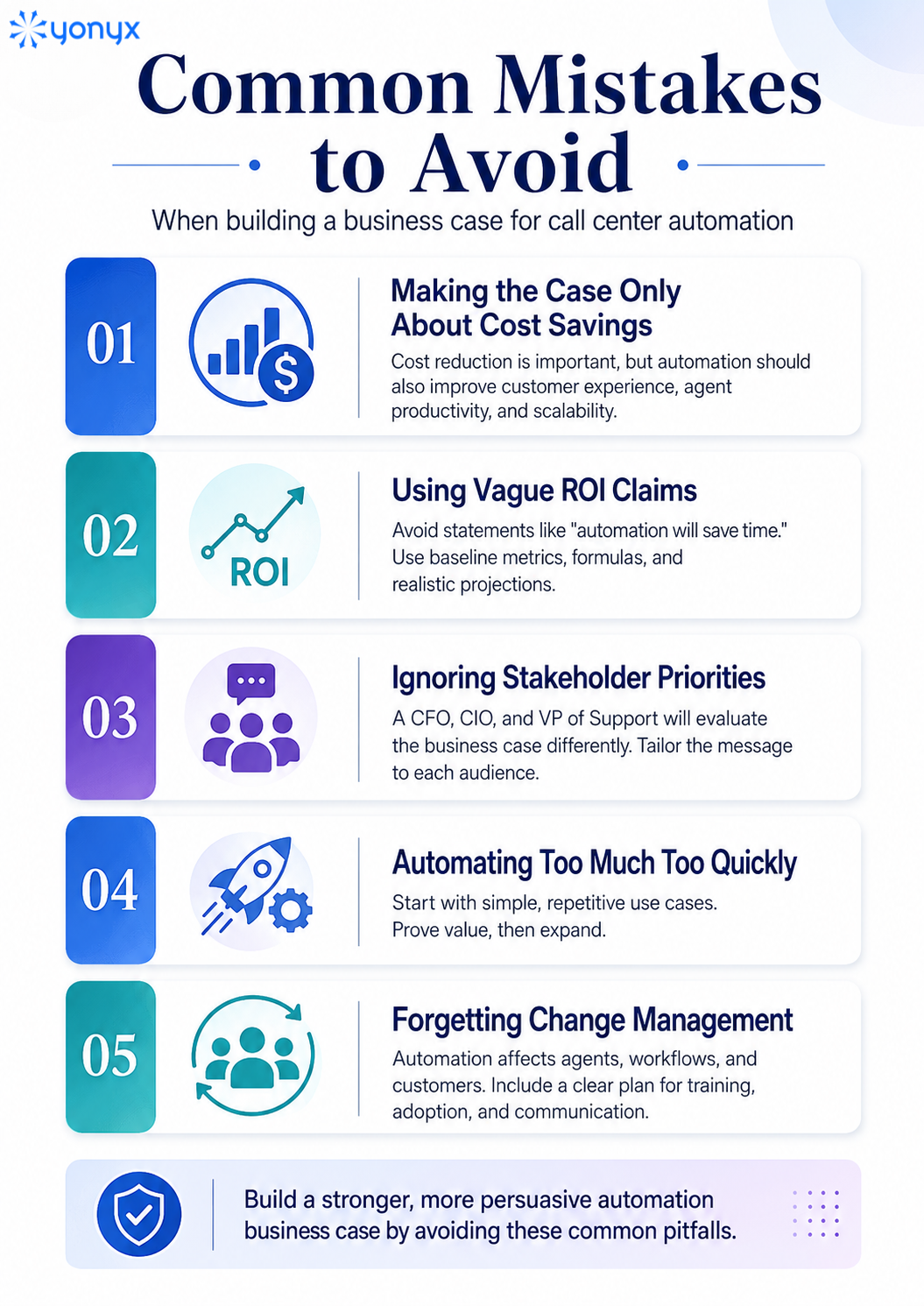
Common Mistakes to Avoid
Before presenting the final business case, it is important to avoid common mistakes that can weaken executive confidence, delay approval, or make automation seem like a cost-cutting tool instead of a measurable business investment.
Note: The calculations and examples in this guide are intended to support business planning. They should not be treated as financial advice or guaranteed results. Validate all projections with your finance, operations, and technology teams before making investment decisions.
Final Thoughts
A strong business case for call center automation software should prove more than technical value. It should show how automation reduces cost per contact, improves customer experience, increases agent productivity, lowers operational risk, and helps the contact center scale.
The most persuasive business cases use real contact center data, clear ROI calculations, stakeholder-specific benefits, a phased implementation roadmap, and well-defined success metrics.
Start with your current performance baseline, identify the highest-volume repetitive workflows, estimate the financial impact, and build a practical rollout plan. When the case is tied to measurable business outcomes, call center automation becomes easier for executives to understand, approve, and support.
Ready to turn your automation business case into guided call center workflows?
FAQs About Building a Business Case for Call Center Automation Software
1. How do you calculate ROI for call center automation software?
Calculate ROI by comparing the cost of automation software with savings from call deflection, reduced handle time, lower after-call work, improved productivity, and reduced hiring pressure.
2. What metrics should be included in a call center automation business case?
Include cost per contact, contact volume, average handle time, average speed to answer, abandonment rate, first-contact resolution, CSAT, NPS, agent turnover, and after-call work time.
3. How does call center automation reduce costs?
Call center automation reduces costs by handling repetitive inquiries through self-service, reducing live-agent workload, shortening manual processes, and helping teams scale without proportional headcount increases.
4. What are the best use cases for call center automation?
The best use cases are high-volume and repetitive tasks such as password resets, order tracking, billing FAQs, appointment scheduling, shipping updates, basic troubleshooting, and call routing.
5. How do you get executive buy-in for call center automation?
To get executive buy-in, connect automation to measurable outcomes such as ROI, lower operating costs, better customer experience, improved agent productivity, and scalable growth.