
Your agents may know the rules. The harder question is
Can they follow every rule when the customer is impatient, the queue is growing, and the conversation suddenly goes off-script?
That is where call center compliance becomes difficult.
Most teams already have policies, training documents, checklists, and approved scripts in place. The real challenge is making sure agents follow them during an actual call while they’re listening to the customer, looking up information, answering questions, and deciding what to do next.
So, how do you make compliance easier to follow in the moment without making conversations feel scripted?
That’s exactly what this blog will help you figure out:
- Why call center compliance often breaks down during live conversations
- How call center scripting software helps agents follow the right process in real time
- Practical ways to improve script adherence without making every call sound robotic
The goal is simple: help agents follow the right process while keeping conversations natural and customer-focused.
What Is Call Center Compliance?
Call center compliance is the practice of following the laws, industry standards, and internal policies that guide how agents contact customers, handle personal information, record calls, deliver required disclosures, and follow approved procedures during interactions.
What compliance looks like depends on the type of call center.
- An outbound sales team may need to follow consent, calling time, and Do Not Call requirements.
- A healthcare contact center may need to protect patient information and verify identity before discussing sensitive details.
- A financial services team may need to follow specific disclosure, verification, and data-handling rules.
In practice, call center compliance is about making sure agents know what they must say, what they must do, and when they need to follow a different process.
Where Script Adherence Fits
Script adherence is one part of call center compliance. It means agents consistently follow the required parts of an approved call script or workflow.
That may include:
- Asking mandatory questions
- Completing verification steps
- Giving required disclosures
- Capturing customer responses
- Following the correct call path
- Escalating when specific conditions are met
Not every sentence needs to be scripted word for word. The important part is making sure agents complete the steps that are required while still being able to handle the conversation naturally.
Key Call Center Compliance Requirements to Know
Call center compliance requirements vary by industry, location, and type of interaction. For agents, the key question is simple: what rule applies here, and what do I need to do next?
Calling, Consent, and Do Not Call Requirements
Outbound teams may need to follow rules covering customer consent, calling practices, required disclosures, and Do Not Call requests.
For the agent, that usually means knowing:
- Whether the customer can be contacted
- Whether consent is required
- What information must be disclosed
- What to do if the customer asks not to be contacted again
The process should make those steps clear before the agent continues.
Call Recording and Disclosure Requirements
When calls are recorded, different consent or disclosure requirements may apply depending on the jurisdiction and type of call.
Agents should know:
- Whether a recording disclosure is required
- When it needs to be given
- Whether the customer needs to provide consent
- What to do if the customer does not agree
These instructions should be part of the call process, not something the agent has to work out in the moment.
Customer Data and Privacy Requirements
Agents may also handle sensitive information such as personal details, health information, account data, or payment information.
Depending on the business, requirements such as HIPAA, PCI DSS, or applicable privacy laws may affect:
- What information agents can access
- What they can ask the customer to provide
- What can be recorded or stored
- What can be shared during the interaction
The compliance requirement may come from a law or industry standard, but the agent still needs a clear workflow that shows how to apply it during the call.
How Does Call Center Scripting Software Help Improve Compliance?
1. Surface Mandatory Steps at the Right Moment
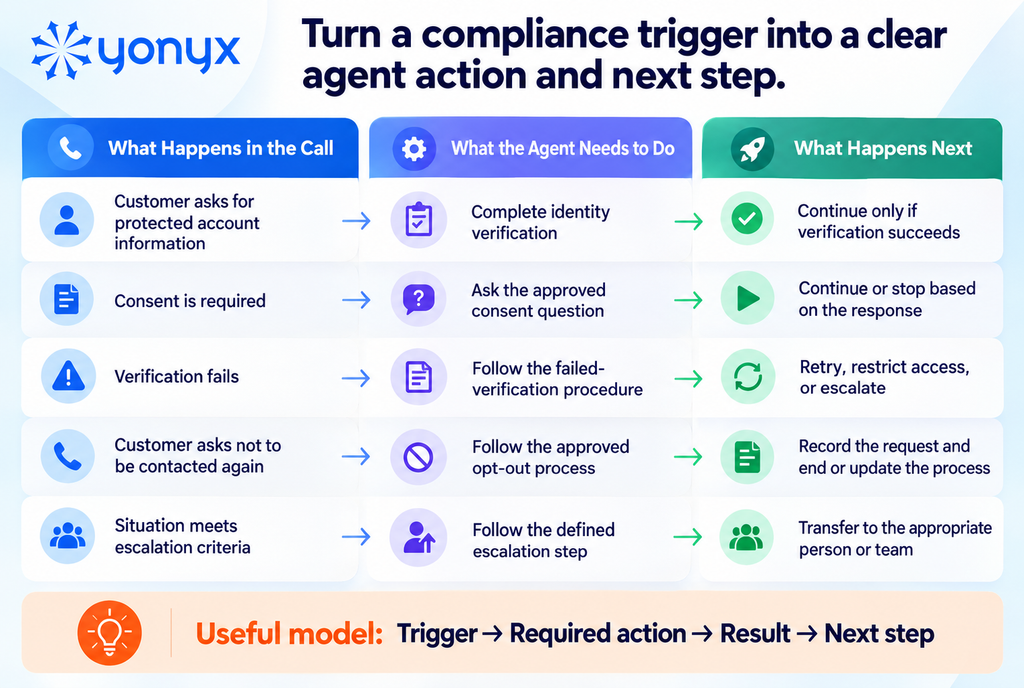
In most contact centers, the problem is not a lack of compliance documentation. The problem is that agents have to recognize the exact moment when a specific requirement becomes relevant. A disclosure may apply only to one product, a verification step may be required before certain account information can be discussed, or an escalation rule may apply only after a particular customer response.
That creates a timing problem. If the agent sees the requirement too early, it gets lost among information that does not yet matter. If they see it too late, the required step may already have been missed.
A well-designed scripting workflow connects each compliance requirement to the event that triggers it.
2. Use Dynamic Call Flows Instead of Linear Scripts
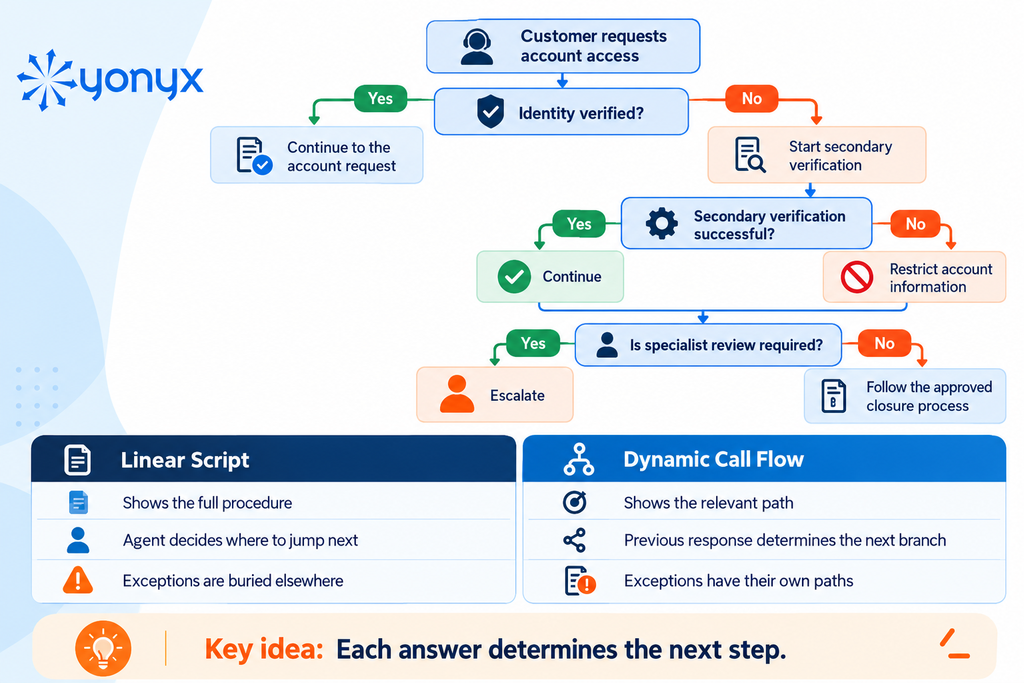
Linear scripts work well when the interaction has very few variables. Compliance-sensitive calls are often the opposite. One answer can change the questions an agent is allowed to ask, the information they can disclose, or whether the process can continue at all.
This is where long scripts become difficult to use. As teams add exceptions, product variations, verification outcomes, and escalation rules, the document gets longer—but the agent still has to work out which section applies.
Dynamic call flows solve a different problem: instead of asking the agent to navigate the entire process, they narrow the workflow after every meaningful decision.
3. Adapt Guidance Based on Customer Responses
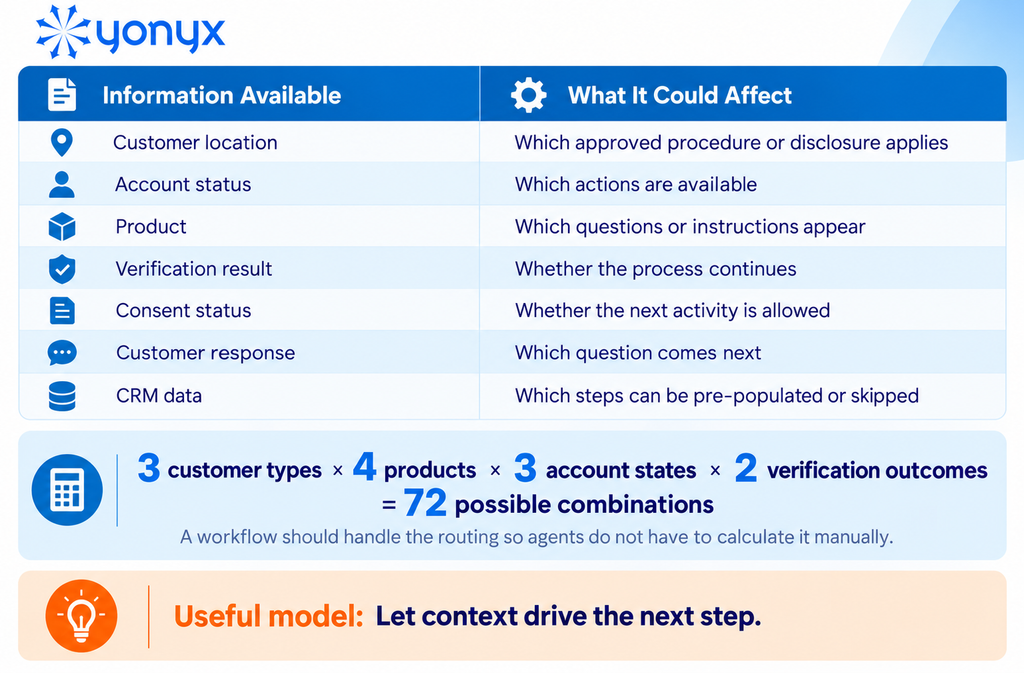
The correct call process is often determined by context, not simply by the reason the customer called.
Two customers asking the same question may require different handling because they are in different locations, use different products, have different account statuses, or have provided different levels of verification or consent.
For an experienced agent, some of these distinctions may feel obvious. At scale, however, expecting every agent to remember every combination creates inconsistency. The more products, customer types, and exception rules a contact center manages, the harder that becomes.
Context-aware scripting allows those conditions to become part of the workflow logic instead of leaving them entirely to agent interpretation.
4. Capture Required Information as Part of the Call
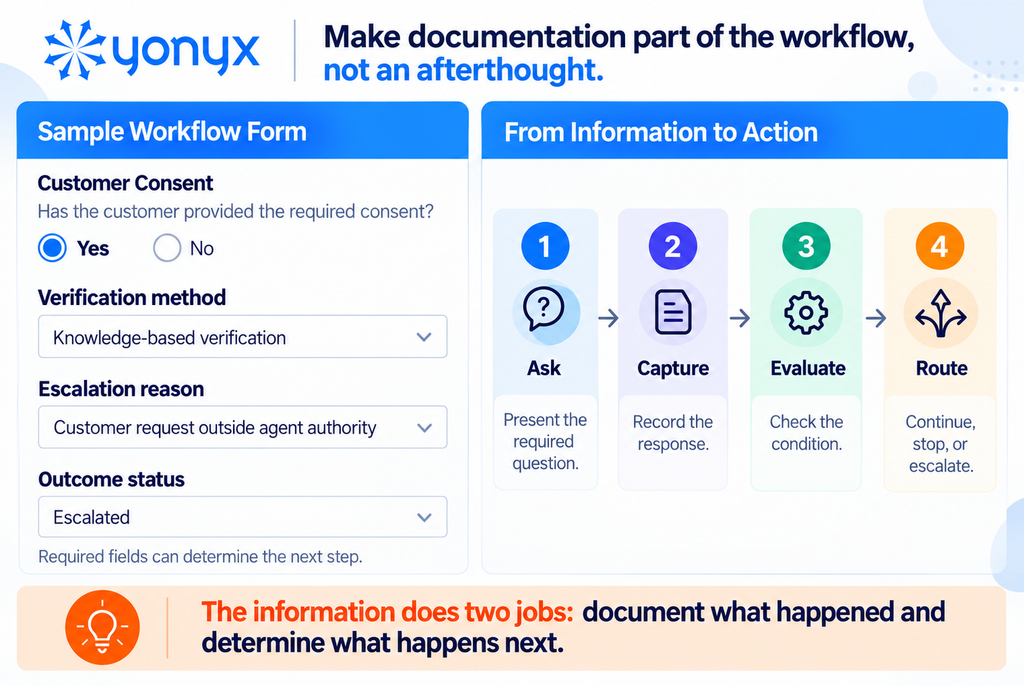
A compliant interaction often creates two responsibilities at the same time: the agent needs to follow the correct process, and the organization may need a reliable record of what happened.
Those two activities are often separated. The agent handles the conversation first and updates the CRM, disposition, or compliance fields afterward. That gap creates room for incomplete notes, forgotten fields, and information entered from memory.
For required data, the safer process is usually to collect it at the point where it affects the conversation.
That way, information such as consent status, verification results, or escalation reasons can become part of the workflow itself rather than an administrative step at the end.
5. Create Clear Exception and Escalation Paths
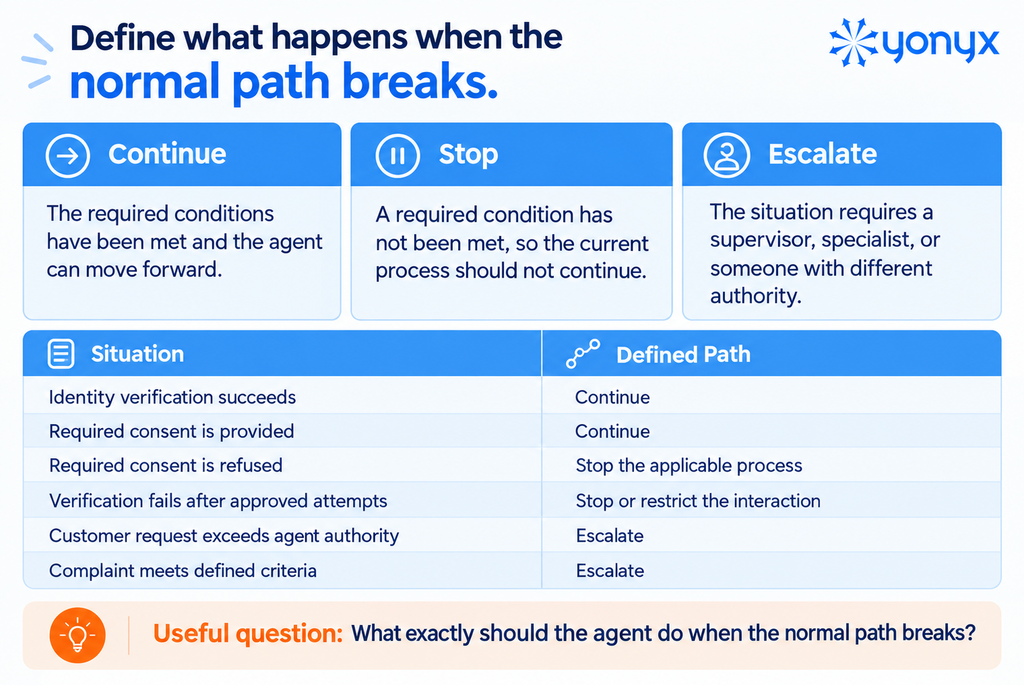
Most call scripts are designed around the expected customer journey. The real test of a compliance process is what happens when the interaction leaves that path.
A customer fails verification. Consent is withdrawn. Information does not match the account. The request exceeds the agent’s authority. A complaint reaches a level that requires specialist handling.
These are the moments when vague instructions become risky.
If the organization already knows the condition that should stop a process or trigger escalation, that decision should be defined before the call reaches the agent. Otherwise, the agent is being asked to make a compliance-sensitive judgment while also managing the customer.
6. Standardize the Process Across Agents
Consistency is often misunderstood in call center scripting.
The goal is not to make every agent use identical language throughout the conversation. The goal is to make sure the parts of the process that cannot vary are completed consistently, while agents still have room to respond naturally where exact wording is unnecessary.
That distinction matters because over-scripting can hide the steps that actually carry compliance risk. If every sentence looks mandatory, agents have no clear signal about which disclosures, questions, or actions are non-negotiable.
A better scripting model separates the process into mandatory, guided, and flexible elements.
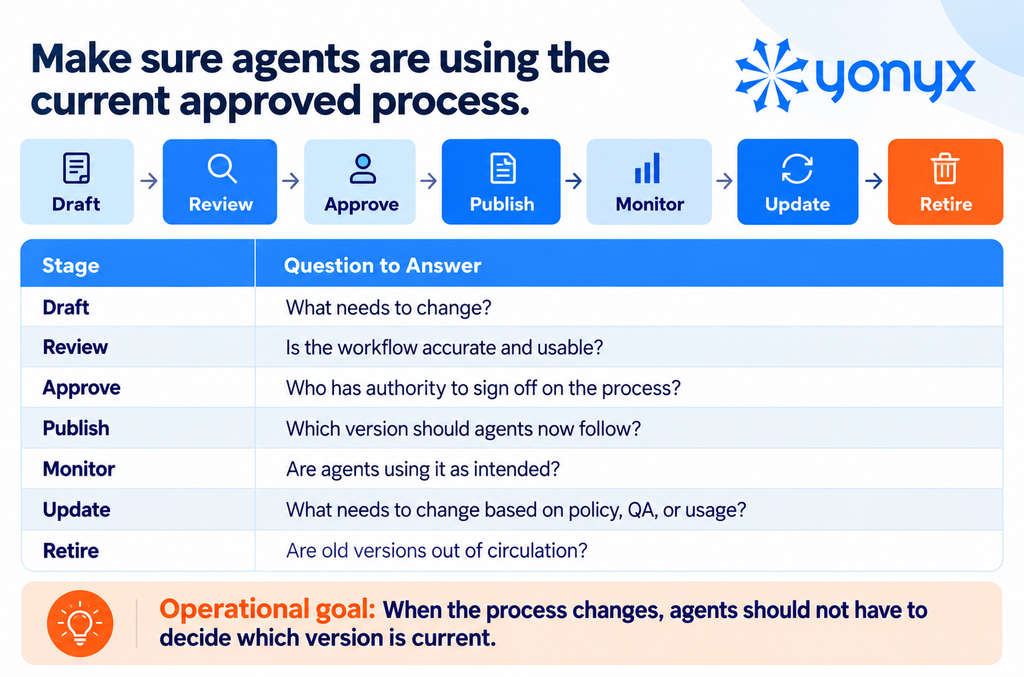
7. Keep Call Scripts and Workflows Centrally Managed
Many script-control problems begin after the process is written.
A compliance or operations team may update the approved procedure, but that does not automatically mean every agent starts using it. Old PDFs, saved documents, training slides, knowledge-base articles, and supervisor notes can continue circulating long after the official process has changed.
For a contact center manager, the real question is therefore not just:
“Did we update the script?”
It is:
“Can we be confident that the workflow agents are using today reflects the current approved process?”
That is a governance problem, not simply a content-editing problem.
8. Track How Agents Follow the Workflow
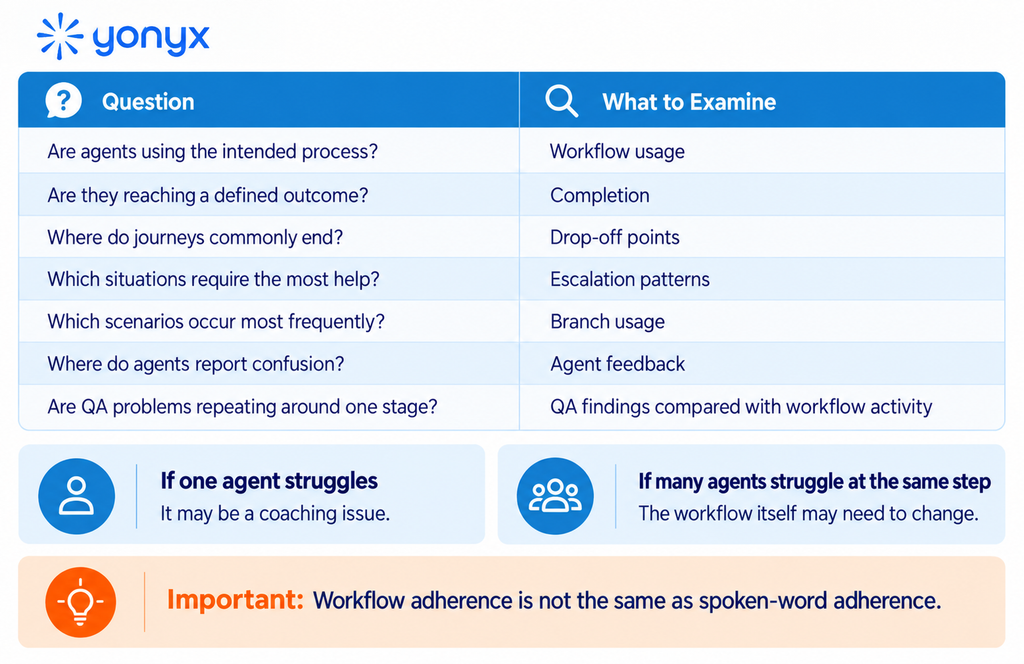
Traditional QA often tells managers whether an interaction passed or failed. It does not always explain where the process became difficult to follow.
That distinction becomes important when the same error appears repeatedly.
If one agent misses a step, coaching may solve it. If dozens of agents drop out of the same workflow branch, request help at the same point, or repeatedly trigger the same escalation, the problem may sit inside the process itself.
Workflow-level reporting gives managers another layer of evidence: not just the final outcome of the call, but how agents moved through the approved process to reach it.
What Happens When Call Center Compliance Breaks Down?
Compliance failures do more than create regulatory risk. They can also affect customer trust, agent performance, and the amount of work required from QA and operations teams.
Common consequences include:
- Penalties and legal exposure: Missing required disclosures, consent steps, or data-handling rules can lead to fines, complaints, or legal action.
- Customer complaints: Customers are more likely to lose trust when agents give inconsistent information or fail to follow expected procedures.
- Reputational risk: Repeated compliance issues can damage how customers and partners view the business.
- More QA and coaching work: When the same mistakes keep appearing, supervisors and QA teams spend more time reviewing calls, documenting issues, and retraining agents.
- Inconsistent processes: If agents interpret procedures differently, customers may get different outcomes for the same type of request.
When the same compliance issue keeps showing up, it is worth asking whether the problem is only with the agent—or whether the process itself is too difficult to follow.
What’s Changing With AI-Powered QA?
Traditional QA often reviews only a small sample of calls, which means recurring compliance issues can go unnoticed.
AI-powered QA changes that by reviewing a much larger share of interactions and flagging patterns such as missed disclosures, prohibited language, or repeated escalation failures.
That helps managers ask a more useful question:
Is this an individual agent issue or a workflow problem affecting the whole team?
AI agents add another layer. Contact centers now need to monitor not only human agents but also what AI systems say, what actions they take, and how they handle customer data.
The compliance model is shifting from
Train → Sample calls → Correct mistakes
to:
Define → Guide → Monitor at scale → Identify patterns → Improve the workflow
The takeaway is simple: compliance is moving from post-call detection toward continuous process control.
Why Training Alone Isn’t Enough for Call Center Compliance
Training is essential, but it prepares agents before the call. Compliance has to happen during the call, often when the conversation takes an unexpected turn.
- Training teaches the rule; it does not always show when the rule applies. Agents still need to recognize the right moment to use a disclosure, verification step, or escalation path.
- Knowledge fades over time. Agents may remember the general process but forget an exception they rarely encounter.
- Live calls create cognitive load. Listening, documenting, checking the CRM, and handling objections all compete for the agent’s attention.
- Processes change faster than training cycles. A script or policy update may take effect before every agent has completed refresher training.
- Unusual scenarios are difficult to rehearse. Training can cover common cases, but agents still need clear guidance when a customer falls outside the standard path.
A stronger model is
Training teaches the process → scripting software helps agents execute it in the moment; and QA shows where the process still needs improvement.
That is why real-time guidance should complement training, not replace it.
Static Call Scripts vs. Dynamic Guided Workflows
A static script gives agents the information they may need. A dynamic guided workflow helps them decide which information matters next.
That difference becomes important when calls involve multiple scenarios, exceptions, or compliance-sensitive steps.
What Should Be Mandatory vs. Flexible in a Call Script?
Not every part of a call needs the same level of control. The useful distinction is between steps that cannot be skipped and language agents can adapt to the customer.
| Part of the Call | Recommended Approach | Example |
| Required disclosure | Mandatory | Read or deliver approved wording where required |
| Identity verification | Mandatory | Complete the defined verification steps before continuing |
| Consent question | Mandatory when applicable | Capture a clear yes/no response. |
| Eligibility or qualification step | Conditional | Ask only when the customer meets the relevant condition. |
| Escalation rule | Mandatory | Transfer or stop when defined criteria are met. |
| Product explanation | Guided | Cover the required points, but allow natural wording. |
| Objection handling | Guided | Follow approved guidance without forcing a word-for-word response. |
| Empathy and transitions | Flexible | Let the agent respond naturally. |
A practical way to think about it is
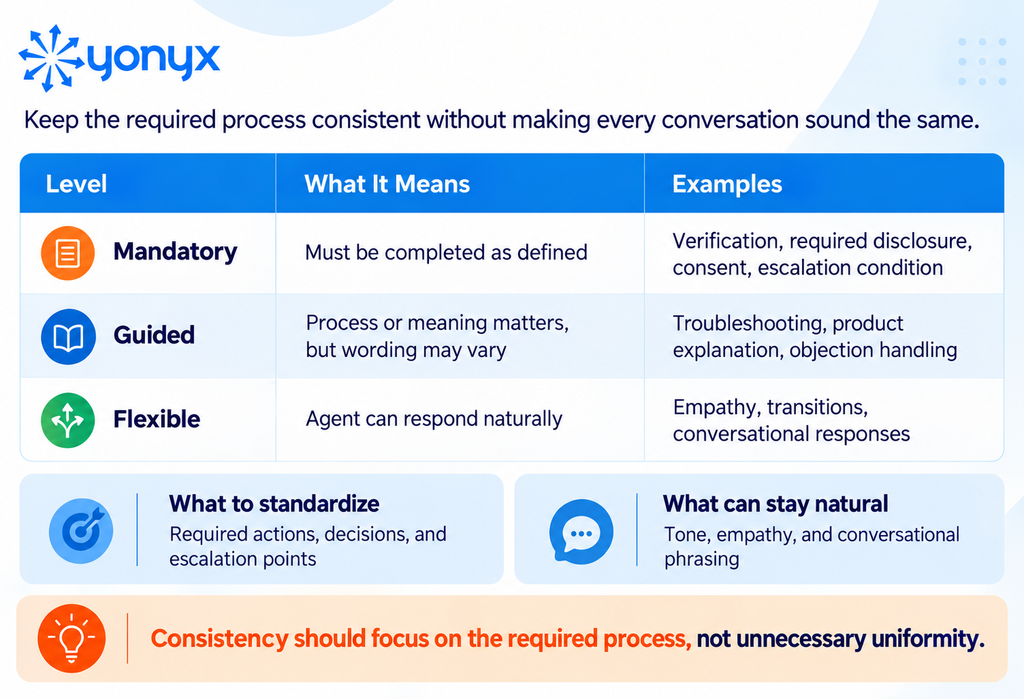
This separation makes compliance easier to manage. Agents know exactly where they cannot improvise while still having enough freedom to keep the conversation natural.
Scripting Software vs. Compliance Monitoring
Scripting software and compliance monitoring solve different parts of the same problem.
Scripting software helps prevent mistakes during the call. It guides agents through the right questions, disclosures, decisions, and escalation paths as the interaction unfolds.
Compliance monitoring helps detect and verify mistakes. It reviews what happened during or after the call using recordings, transcripts, QA reviews, or speech analytics.
| Scripting Software | Compliance Monitoring |
| Guides the agent during the interaction | Reviews the interaction |
| Helps prevent missed process steps | Helps detect missed requirements |
| Uses workflows, scripts, and branching logic | Uses recordings, transcripts, QA, or speech analytics |
| Shows what should happen next | Checks what actually happened |
| Can track workflow paths | Can verify spoken language and call behavior |
For example, a workflow may show that an agent reached a required disclosure step. That is useful for process tracking, but it does not necessarily prove the exact wording was spoken correctly.
That kind of verification usually requires a second layer, such as:
- Call recording
- Manual QA
- Transcript analysis
- Speech analytics
- Real-time script-adherence monitoring
The strongest compliance setup often uses both:
Guidance to reduce preventable mistakes → Monitoring to catch what still goes wrong.
What to Look for in Call Center Scripting Software
If compliance is part of the use case, focus on features that help agents follow the right process consistently—not just read a script on screen.
- Dynamic branching: The workflow should change based on customer responses, verification results, account status, or other conditions.
- Conditional logic: Teams should be able to define when specific questions, disclosures, or actions appear.
- Structured data capture: Agents should be able to record required information such as consent, verification results, or escalation reasons within the workflow.
- CRM integration: Customer data should help shape the script without forcing agents to switch between multiple systems.
- Easy workflow updates: Process owners should be able to update scripts quickly when policies or procedures change.
- Version control: Teams need a clear way to manage the current approved workflow and avoid outdated copies.
- Workflow reporting: Managers should be able to see how agents move through the process, where they drop off, and which paths are used most.
- Role-based access: Different teams may need different scripts, workflows, or editing permissions.
- Integration and API support: The scripting tool should fit into the contact center’s existing CRM, support, and operational systems.
The best platform is not the one with the longest feature list. It is the one that makes the approved process easier for agents to follow during a live interaction.
| Struggling to Keep Complex Call Processes Consistent? Yonyx helps turn approved call procedures into interactive decision trees that guide agents through the right steps, exceptions, and customer scenarios as the conversation unfolds. Explore Yonyx for Guided Call Workflows |
Call Center Compliance Checklist
Use this checklist to review whether your current call process gives agents enough guidance during live interactions:
- Are required disclosures clearly identified?
- Are verification and consent steps placed at the right point in the call?
- Can the script adapt to different customer scenarios?
- Are stop and escalation conditions clearly defined?
- Can agents capture required information within the workflow?
- Are outdated scripts removed when processes change?
- Are mandatory steps separated from flexible conversation guidance?
- Can managers see where agents drop off or deviate from the workflow?
- Are recurring QA issues used to improve the call flow?
- Are agents trained on both the policy and how to follow it during a live call?
A compliant process should not depend on agents remembering every exception. The workflow should make the correct next step clear when it matters.
Frequently Asked Questions About Call Center Compliance
How Often Should Call Center Compliance Scripts Be Updated?
Call center compliance scripts should be reviewed whenever regulations, internal policies, products, disclosures, or customer processes change. Teams should also conduct periodic reviews to ensure agents are always working from the current approved version.
How Do You Measure Script Adherence in a Call Center?
Script adherence is measured by checking whether agents complete required questions, disclosures, verification steps, and other mandatory actions during calls. QA reviews, workflow data, recordings, transcripts, and speech analytics can all support this measurement.
How Can a Call Center Prove That Required Compliance Steps Were Followed?
Call centers can use workflow records, timestamps, captured responses, call recordings, transcripts, dispositions, and QA results. Combining process data with call evidence provides a clearer record of what the agent did and what was actually communicated.
Who Should Be Responsible for Maintaining Call Center Compliance Scripts?
Compliance or legal teams should define the requirements, while operations teams translate them into practical call workflows. QA teams can monitor adherence, and designated workflow owners should maintain and update the live version agents use.
Does Call Center Compliance Apply to Remote Agents?
Yes. Remote agents must follow the same applicable compliance requirements as office-based agents, including rules for customer data, verification, disclosures, consent, and approved procedures. Remote work does not remove an organization’s compliance responsibilities.