
A support agent can find the correct policy and still make the wrong decision.
The article may be accurate. The search result may be relevant. But the agent still has to interpret the policy, check which conditions apply, ask the right follow-up questions, complete the steps in the right order, and decide when to escalate. That work becomes harder when the answer is split across a CRM record, a shared drive, a ticketing system, and someone’s memory.
An internal knowledge base for customer service should make approved information easy to find. But retrieval is only the starting point. Strong support operations also consider how agents will apply that information during a live interaction.
That distinction matters as service organizations invest heavily in AI. In a 2026 survey, Gartner found that 91% of customer service leaders were under executive pressure to implement AI, while 58% planned to develop agents into knowledge-management specialists. AI is raising the value of governed knowledge, not eliminating the need for it.
The practical goal is straightforward: give agents reliable knowledge in the format best suited to the task. A simple question may need a short article. A visual procedure may need a video. A conditional, high-risk process may require step-by-step guidance for call center agents.
What Is an Internal Knowledge Base for Customer Service?
An internal knowledge base for customer service is a private, governed system where support employees can find approved policies, procedures, product information, troubleshooting instructions, escalation rules, scripts, and training resources.
It gives agents a dependable place to start when resolving customer questions. It also gives the organization a way to assign ownership, control updates, retire obsolete guidance, and reduce reliance on informal answers passed between coworkers.
The word “system” matters here. An effective knowledge base is not simply a folder full of documents. The current ISO 30401 knowledge-management standard describes knowledge management as something organizations establish, implement, maintain, review, and improve. The standard is under revision, but that principle remains sound: knowledge quality depends on an operating discipline, not just a software purchase.
Internal Knowledge Base Definition
For a customer service organization, an internal knowledge base should answer four questions:
- What does the agent need to know?
- In which situations does that knowledge apply?
- What action should the agent take?
- Who is responsible for keeping the guidance accurate?
The first two questions are usually handled well by conventional knowledge articles. The third becomes more difficult when the process branches according to the customer’s account, product, location, entitlement, symptoms, or previous answers.
The Knowledge-Centered Service Practices Guide reinforces this contextual view of service knowledge. Its practices focus on capturing the requestor’s context, reusing knowledge during problem-solving, improving content through use, and integrating knowledge into the service process.
Internal Knowledge Base vs. External Knowledge Base
An internal knowledge base is built for employees. It can contain restricted policies, internal escalation paths, approval thresholds, diagnostic notes, and instructions that should not be shown directly to customers.
An external knowledge base is built for customers. It often draws from the same approved source material, but the content is adapted for public access, customer language, security, and disclosure requirements.
The two systems should not drift into separate versions of the truth. A warranty rule should not say one thing to the agent and another to the customer. What changes is the presentation, level of detail, and permitted access.
External knowledge also needs to work beyond the company website. Gartner reported in 2025 that 51% of surveyed customer service journeys began on third-party platforms such as Google, YouTube, and ChatGPT. That makes consistent, well-governed source content increasingly important across both internal support and guided customer self-service.
Internal Knowledge Base vs. Wiki, Intranet, and Help Desk
These systems overlap, but they are not interchangeable.
| System | Primary purpose | Typical content | Primary users | Main limitation for customer service |
| Internal knowledge base | Store approved operational knowledge | Policies, SOPs, troubleshooting, scripts | Employees and agents | May still require the agent to interpret what applies |
| Wiki | Support collaborative documentation | Team notes, project knowledge, technical documentation | Cross-functional teams | Content can become inconsistent or lightly governed |
| Intranet | Provide an internal company hub | Announcements, HR resources, links, directories | All employees | Usually too broad for real-time support guidance |
| Help desk | Manage customer cases and requests | Tickets, conversations, customer history | Service teams | Case management does not guarantee usable knowledge |
| Guided workflow | Lead users through conditional steps | Diagnostics, call flows, eligibility checks | Agents or customers | Requires process design and active maintenance |
A knowledge-management program is broader than any of these tools. APQC’s Knowledge Management Framework treats KM as a roadmap for designing, implementing, and sustaining an organizational capability. The repository is one component. Governance, process, roles, measurement, and adoption are just as important.
Why Customer Service Teams Need an Internal Knowledge Base
Customer service teams need faster access to accurate information, not more content. A strong internal knowledge base reduces delays, inconsistent answers, and dependence on experienced employees who know where critical information is stored.
Reduce Time Spent Searching
Agents often move between CRMs, help desks, shared drives, messaging tools, and colleagues to find answers. Each switch increases the risk of outdated information or lost context. A knowledge base should provide a clear source of truth and, where possible, surface guidance directly within the agent’s workflow.
Give Agents Consistent Answers
Conflicting refund, eligibility, or escalation decisions often result from unclear or duplicated guidance. A governed knowledge base establishes approved answers, ownership, and review dates. For complex interactions, consistent guidance across support agents can standardize required questions and actions while still allowing appropriate agent judgment.
Improve Onboarding
New agents need practical decision support, not just policy training. Customer service and troubleshooting decision-tree examples show how complex procedures can be broken into manageable steps, helping new hires reach proficiency faster.
Preserve Operational Knowledge
Experienced employees often hold valuable undocumented knowledge. Capture information that repeatedly affects outcomes, especially high-volume questions, common escalations, costly mistakes, and processes known by only a few employees.
What Should a Customer Service Knowledge Base Include?
A customer service knowledge base should be a practical resource that helps agents complete specific tasks accurately and quickly. Content should be concise, actionable, and governed well enough that agents can trust it.
Policies, Rules, and Approvals
Include refund, cancellation, warranty, verification, discount, escalation, and disclosure requirements. Static articles work for simple rules, but when eligibility depends on several conditions, conditional logic and guided response paths can help agents apply approved rules consistently.
SOPs and Call Flows
Document repeatable processes such as returns, appointment changes, account updates, caller verification, outage handling, and escalations. Use checklists for linear processes and a decision-tree maker for complex SOPs when the next step depends on customer responses or account data.
Troubleshooting Guides
Organize troubleshooting around customer symptoms, diagnostic questions, likely causes, corrective actions, resolution checks, and escalation criteria. Guided troubleshooting decision trees can simplify complex diagnostics by showing only relevant next steps.
Product Information and Scripts
Include product details, limitations, approved explanations, templates, and call scripts. Yonyx’s AI-assisted call-script authoring can support drafting and translation, but human review remains essential. The NIST Generative AI Profile offers guidance for managing generative AI risks.
How to Build an Internal Knowledge Base for Customer Service
The fastest way to waste a knowledge-management budget is to migrate every old document into a new platform and call the project complete.
A successful build starts with service outcomes, not content volume. It identifies which knowledge matters, removes duplication, assigns ownership, chooses the right delivery format, and tests whether agents can use the result under real working conditions.
1. Define the Service Outcomes the Knowledge Base Must Improve
Choose a small set of outcomes tied to the actual support problem.
Possible measures include:
- Search success
- Time to proficiency
- First-contact resolution
- Repeat-contact rate
- Escalation rate
- Process error rate
- Customer effort
- Agent confidence
- Compliance with required steps
Average handle time may belong on the list, but it should not dominate it. A shorter interaction is not a better interaction when the agent gives the wrong answer or creates a repeat contact.
Define a baseline before implementation. Then determine what evidence would show that the knowledge base contributed to the change.
2. Audit Existing Content and Agent Search Behavior
Inventory where support knowledge currently lives:
- Help-desk articles
- CRM notes
- Shared drives
- PDFs and manuals
- Internal chat channels
- Training decks
- Agent-created documents
- Existing scripts and flowcharts
Then observe how agents actually look for answers. Search logs and repository inventories are useful, but they do not reveal the entire problem. Sit with frontline agents. Ask them what they search for, which articles they distrust, where they go when search fails, and which processes require help from a senior colleague.
The gap between the official process and the working process is where the most valuable findings usually appear.
3. Prioritize High-Value Knowledge
Do not begin with the easiest content to migrate. Begin with the knowledge that has the greatest operational consequence.
A practical prioritization model is:
Priority = Volume × Variability × Risk
- Volume: How often does the issue occur?
- Variability: How many conditions or possible paths affect the answer?
- Risk: What happens if the agent gets it wrong?
A high-volume password-reset question may deserve a short, optimized article. A lower-volume medical scheduling or financial eligibility process may deserve attention first because an incorrect decision creates much greater risk.
Existing articles with complex logic can be candidates to convert high-volume knowledge-base content into guided workflows.
4. Choose the Right Format for Each Task
Not every piece of knowledge should be an article.
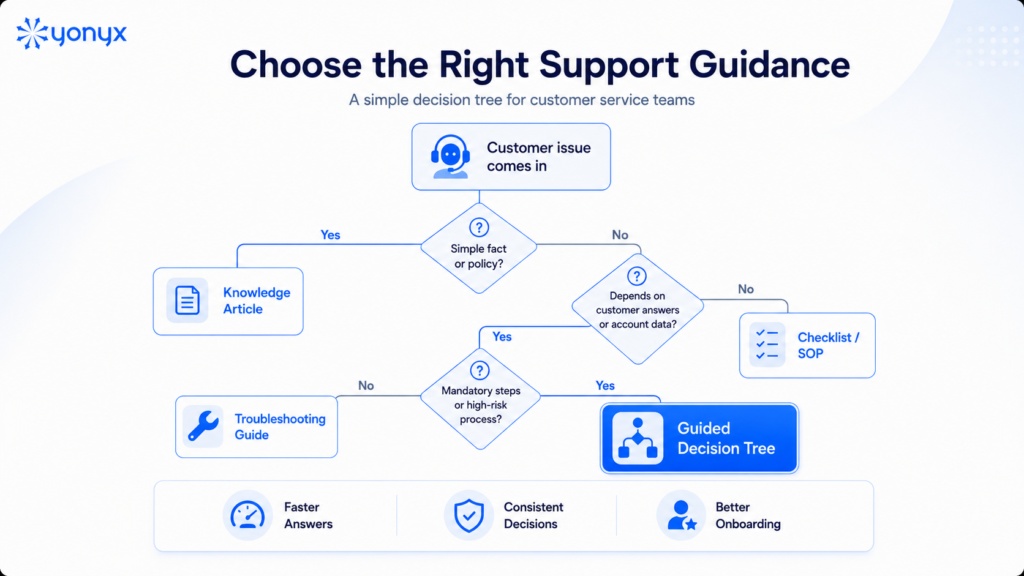
Use an article when the agent needs to understand or reference information. Use a workflow when the agent must apply several rules in a controlled sequence.
This distinction prevents two common failures: turning every answer into an oversized article and turning every procedure into an unnecessarily rigid process.
See how Yonyx can turn complex support procedures into interactive decision trees.
5. Design a Support-Focused Information Architecture
Organize knowledge around the work agents perform and the language customers use.
A structure based entirely on internal departments may make sense to the company but not to the person handling the request. Agents tend to search for “charged twice,” “device will not connect,” or “cancel after renewal”—not for the department that owns the policy.
Useful organizing dimensions include:
- Customer intent
- Product or service
- Symptom
- Account type
- Process
- Region
- Channel
- Escalation path
Keep content modular. A warranty definition, verification procedure, troubleshooting step, and escalation rule can be maintained independently and linked where needed. That is easier to govern than duplicating the same paragraph across dozens of long articles.
6. Assign Owners, Reviewers, and Approval Workflows
Every important knowledge asset needs an accountable owner.
Define who can:
- Draft content
- Validate technical accuracy
- Approve policy language
- Publish changes
- Review performance data
- Archive obsolete versions
- Approve AI-generated material
Ownership should follow expertise and risk. A knowledge manager may control structure and lifecycle. A product specialist validates technical content. Legal or compliance reviews regulated language. Operations determines whether the guidance works in the live support environment.
A title such as “knowledge owner” means little unless the person has clear decision rights and time allocated to the work.
7. Test the Content With Frontline Agents
Test with realistic cases, not a quick editorial review.
Give agents real scenarios and observe whether they can:
- Find the right resource.
- Understand the instructions.
- Identify which conditions apply.
- Reach the correct outcome.
- Recognize when to escalate.
- Explain the result to the customer.
Include edge cases and incomplete information. Those are the situations where apparently clear content often breaks down.
Ask reviewers to reconstruct the interaction afterward. If they cannot determine why the agent reached a particular decision, the content or workflow may not provide enough evidence.
8. Launch in Phases and Build Feedback Into the Workflow
Start with one team, product, or high-value call driver.
A controlled launch makes it possible to compare behavior, identify missing content, and fix usability problems before the knowledge base expands. It also gives the project team a credible internal example rather than asking the entire organization to trust an untested system.
Train agents on both the tool and the expected behavior:
- When to search
- When to use guided workflows
- How to flag an issue
- How to suggest an improvement
- Which source is authoritative
- What to do when guidance appears wrong
Knowledge implementation is not finished at launch. The KCS framework treats the work as a continuous loop of capture, reuse, improvement, content health, process integration, and performance assessment.
How to Manage and Maintain the Knowledge Base
A knowledge base loses value quietly.
An article remains searchable after the product changes. A policy is copied into three locations. Agents stop trusting a troubleshooting guide and begin sharing their own version. Usage may remain high even when the content is wrong.
Maintenance therefore needs a defined operating model.
Establish a Review Cadence Based on Risk
Do not apply one review schedule to every content type.
Review frequency should reflect the following:
- Business risk
- Content volatility
- Usage volume
- Product-release schedules
- Regulatory requirements
- Known policy changes
- Customer impact
A product description may be reviewed after each release. A regulated disclosure may require formal approval whenever the underlying rule changes. A stable definition may need only an annual check.
ISO 30401 requires knowledge-management systems to be maintained, reviewed, and improved, but it does not prescribe one universal interval.
Capture Agent Feedback at the Point of Use
A generic quarterly survey may reveal that agents dislike the knowledge base. It rarely identifies the exact sentence, decision point, or missing condition that caused the problem.
Point-of-use feedback preserves the context. The organization can see which content the agent was using, where they became stuck, and what situation triggered the concern.
The feedback mechanism should be simple enough to use during or immediately after the interaction. It should also enter a visible review workflow. A feedback button that sends comments into an unmanaged inbox creates the appearance of participation without improvement.
Use Search and Workflow Data to Identify Gaps
Different data patterns reveal different problems:
- Zero-result searches: The content may be missing or use different language.
- Frequent reformulation: Search terminology may not match customer language.
- High article views with low resolution: The content may be found but not usable.
- Repeated workflow abandonment: The path may be unclear, too long, or incomplete.
- Concentrated escalations: A policy or troubleshooting branch may need revision.
- Unexpected path distribution: Agents may be interpreting an early question differently.
Yonyx can analyze decision-tree paths and outcomes through incident reports, traversal analytics, usage reporting, custom metrics, and search-activity reports.
Retire Duplicate and Obsolete Content
Do not leave outdated material available “just in case.”
Archive content when it is no longer valid, replace duplicate articles with one canonical source, and redirect commonly used old resources where possible. Preserve version history when audit or regulatory requirements demand it, but do not make obsolete instructions easy for agents to use accidentally.
Retirement authority should be explicit. Otherwise, everyone can create content and nobody feels permitted to remove it.
How to Choose Internal Knowledge Base Software
There is no universally best internal knowledge base for customer service. The right choice depends on the team’s size, workflows, integrations, governance needs, and service complexity.
Search and Content Discovery
Test whether agents can find answers using real customer language. Evaluate relevance, synonyms, typo tolerance, filters, permissions, natural-language search, search analytics, and zero-result reporting. Use anonymized real queries during vendor demonstrations.
Authoring and Governance
Assess the full content lifecycle, including templates, ownership, approvals, version history, review reminders, publishing permissions, archives, AI-draft review, and change records. Easy authoring is useful only when supported by strong governance.
Workflow and CRM Integration
Agents should access guidance without unnecessary system switching. Evaluate CRM integration, data prepopulation, contextual filtering, API connectivity, and write-back capabilities. Yonyx, for example, supports embedded decision trees, APIs, URL parameters, data connectors, and third-party API calls.
Analytics, Security, and Compliance
Measure more than article views. Track search success, completion, abandonment, escalation, adoption, and resolution outcomes. Also evaluate authentication, permissions, encryption, logging, retention requirements, publishing controls, and auditability.
Finally, match the tool to the need: wikis for collaboration, knowledge bases for approved content, AI assistants for discovery, and decision trees for guided procedures.
When a Knowledge-Base Article Is Not Enough
A well-written article is still the right format for a large share of support knowledge. The mistake is treating it as the right format for every task.
An article becomes less effective when the agent must interpret several conditions, remember which steps are mandatory, combine information from other systems, and document why a particular outcome was chosen.
That is an execution problem.
Knowledge Access vs. Knowledge Execution
Knowledge access answers: What does the organization know?
Knowledge execution answers: What should happen in this specific case?
Consider a service-credit policy. The article may explain the credit rules accurately. The agent still needs to determine:
- Which service plan applies
- Whether the incident qualifies
- Whether the customer has already received a credit
- Whether the amount exceeds the agent’s authority
- Whether approval is required
- What explanation should be given
- What must be recorded
A searchable article explains the policy. A guided workflow operationalizes it.
This distinction does not make the article obsolete. The article remains the governed source of policy. The workflow converts the relevant rules into an executable sequence.
Five Signs Content Should Become an Interactive Decision Tree
Consider a decision tree when:
- The correct answer depends on multiple conditions.
The next action changes according to earlier responses or account data. - Agents frequently skip or reorder steps.
Mandatory verification, disclosures, or diagnostic actions are applied inconsistently. - The process requires customer-specific data.
Product, entitlement, geography, history, or CRM values affect the outcome. - Errors create material risk.
A wrong decision can create financial loss, customer harm, a compliance failure, or an avoidable escalation. - The organization needs a reviewable path.
Managers must reconstruct which questions were asked and why the outcome was reached.
These signs are an evaluation framework, not a rule that every complex article must become a decision tree. The process also needs to be sufficiently stable and understood to encode responsibly.
How a Knowledge Base, AI Assistant, and Decision Tree Work Together
A useful support architecture has three functional layers:
Knowledge layer: Stores approved facts, policies, procedures, and documentation.
Retrieval layer: Helps users find, summarize, or surface relevant knowledge through search or AI.
Execution layer: Guides the user through a conditional procedure and records what occurred.
The boundaries are not rigid. An AI assistant can perform actions, and a decision tree can contain knowledge. The model is useful because it forces leaders to ask which problem they are solving.
AI can help an agent locate a warranty policy. A decision tree can apply that policy to the customer’s product, date, damage type, and prior claim. The original knowledge source remains necessary for governance and updates.
Deterministic Workflows for High-Consequence Support Processes
A deterministic workflow follows the same encoded logic when given the same inputs.
That provides stronger process control where an organization must enforce sequencing, mandatory questions, escalation rules, or reviewable decision paths. It can be especially useful for identity verification, financial approvals, safety procedures, regulated disclosures, and other high-consequence interactions.
Deterministic does not mean infallible.
A workflow can still contain outdated rules, missing branches, unfair assumptions, or incorrect logic. It must be reviewed, tested, monitored, and updated like any other operational system.
The advantage is not that deterministic logic is automatically correct. The advantage is that the logic is explicit, repeatable, and inspectable.
How to Measure Whether the Knowledge Base Is Working
Page views are not enough.
A frequently used article may be excellent. It may also be the only available resource for a problem it fails to solve. Measurement should show whether employees find knowledge, trust it, apply it, and reach better outcomes.
Knowledge Usage Metrics
Track:
- Search success rate
- Zero-result searches
- Query reformulation
- Article usage
- Agent feedback
- Stale-content rate
- Review completion
- Adoption by team
- Content reuse
- Duplicate-content volume
Interpret these measures together. A falling search volume might mean that agents cannot find the search tool, not that the knowledge base has become more efficient.
Agent Performance Metrics
Relevant measures can include:
- Time to proficiency
- Escalation rate
- Repeat contacts
- Process errors
- Quality scores
- Agent confidence
- Required-step compliance
- First-contact resolution
- Average handle time
Do not reward lower AHT in isolation. Fast but incomplete interactions can shift work into callbacks, escalations, complaints, or rework.
Use a balanced view that includes customer, operational, and employee outcomes.
Workflow Outcome Metrics
Guided processes create another category of evidence:
- Completion rate
- Abandonment point
- Path distribution
- Dead ends
- Escalation points
- Required-step completion
- Intended outcome reached
- Avoidable escalation
- Differences between experienced and new agents
A useful composite measure is execution success rate: the percentage of interactions in which the correct path was completed, mandatory steps were followed, and the intended outcome was reached without an avoidable escalation.
The definition must match the process. There is no universal benchmark.
Frequently Asked Questions
What is the best internal knowledge base for customer service?
The best internal knowledge base is the one that fits the team’s service processes, governance requirements, integrations, risk profile, and measurement needs. A searchable article platform may be enough for straightforward reference content. Teams handling conditional troubleshooting or tightly controlled procedures may also need interactive guidance.
What should be included in a customer service knowledge base?
Include approved policies, product information, troubleshooting guidance, SOPs, escalation criteria, call scripts, response templates, training resources, and ownership metadata. Organize the content around customer intents and agent tasks rather than only internal departments.
How often should knowledge-base content be reviewed?
Review frequency should depend on usage, volatility, risk, and known change events. High-risk or frequently changing content may need event-triggered review. Stable reference material may require less frequent checks. There is no useful universal review interval.
Can AI replace an internal knowledge base?
No. AI can improve search, summarization, drafting, and interaction, but it still needs reliable source knowledge, access controls, testing, governance, and human accountability. Without governed source material, AI can make inconsistent knowledge easier to distribute.
When should a knowledge-base article become a decision tree?
Use a decision tree when the correct next step changes according to customer answers, account data, business rules, or previous actions. It is also useful when mandatory sequencing, escalation control, or a reviewable decision path matters.
An internal knowledge base for customer service should do more than collect documents. It should give agents a reliable source of approved knowledge, place that knowledge inside the support workflow, and make clear which format fits each task.
Articles remain essential. Search and AI can make those articles easier to find. But complex service work often requires another layer: guidance that helps agents apply the knowledge consistently, one decision at a time.
Turn support knowledge into guided workflows and see how Yonyx can help agents navigate complex customer interactions step by step.