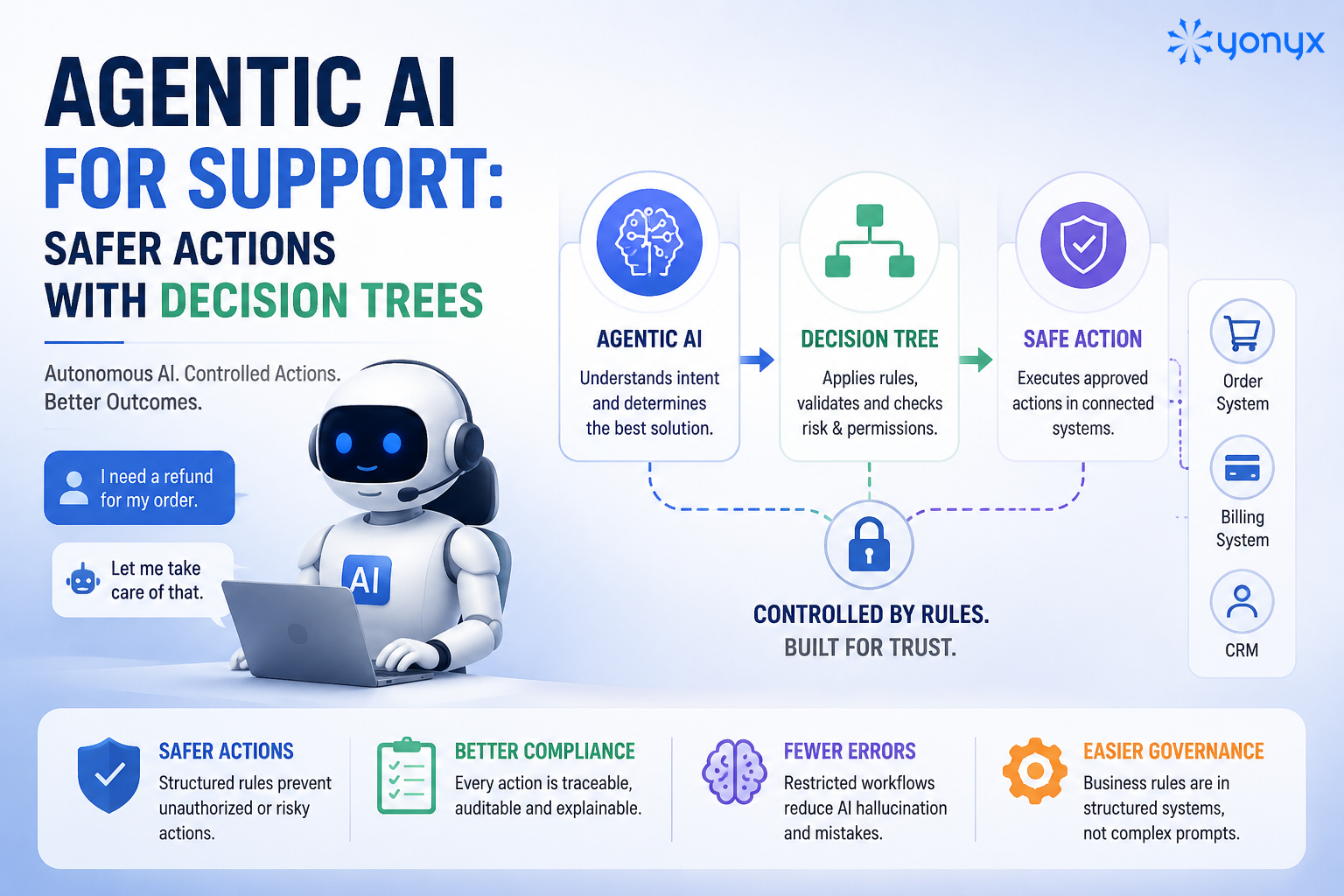
Agentic AI for customer support allows businesses to automate complex workflows by understanding customer intent, reasoning through requests, accessing connected systems, and executing approved actions.
However, autonomous actions create risks around accuracy, security, and compliance. Organizations need a way to ensure AI actions follow defined rules before execution.
Combining Agentic AI with decision trees solves this challenge.
Agentic AI handles intent understanding and reasoning, while decision trees enforce validation rules, permissions, and approval steps.
A safer support workflow follows:
Customer request → Agentic AI understands intent → Decision tree validates action → Backend system executes
This approach helps organizations scale AI support automation while maintaining control over critical customer interactions.
| Quick Answer Agentic AI becomes safer for customer support when combined with decision trees. AI handles customer understanding and reasoning, while decision trees enforce business rules, permissions, approvals, and escalation paths before actions are executed. |
What Is Agentic AI for Customer Support?
Agentic AI for customer support refers to AI systems that can independently understand customer requests, plan multiple steps, access business tools, and complete tasks without requiring constant human instructions.
Unlike traditional chatbots that follow predefined scripts, agentic AI systems can:
- Understand changing customer intent
- Reason through complex requests
- Retrieve information from multiple systems
- Trigger workflows through APIs
- Adapt responses based on context
- Escalate issues when human judgment is required
In simple terms:
Traditional chatbots answer questions. Agentic AI systems complete tasks.
For example:
A chatbot may tell a customer how to request a refund.
An agentic AI system can:
- Identify the refund request
- Verify customer information
- Check refund eligibility
- Validate company policies
- Trigger the refund workflow
- Inform the customer about the outcome
Agentic AI vs Traditional Chatbots: What Has Changed?
The biggest difference between traditional automation and AI agents for customer support is the ability to take goal-oriented actions.
| Capability | Traditional Chatbots | Agentic AI Systems |
| Decision-making | Rule-based responses | Goal-driven reasoning |
| Conversation handling | Single interaction flows | Maintains broader context |
| Data usage | Limited knowledge sources | Connects with enterprise systems |
| Actions | Provides instructions | Executes workflows |
| Problem resolution | Ticket deflection | End-to-end resolution |
| Adaptability | Requires manual updates | Adjusts based on context |
Traditional bots were designed to reduce repetitive questions.
Agentic AI is designed to reduce repetitive work.
How Is Agentic AI Changing Customer Support Operations?
Agentic AI is transforming customer support by enabling autonomous resolution, intelligent routing, proactive engagement, and better agent assistance.
Modern contact centers are shifting from:
Reactive support → Predictive and automated resolution
Instead of waiting for customers to report problems, AI systems can identify issues, recommend solutions, and execute approved actions.
Key Use Cases of Agentic AI in Customer Support
1. Autonomous Resolution of Customer Requests
Agentic AI can resolve common support requests by connecting directly with business systems such as:
- CRM platforms
- Billing systems
- Order management systems
- Scheduling tools
- Knowledge bases
Common examples include:
- Checking order status
- Updating subscriptions
- Scheduling appointments
- Processing returns
- Verifying account information
However, not every action should be fully autonomous.
A safer approach is:
Low-risk actions → AI automation
High-risk actions → AI + validation + human approval
Example:
| Request | Recommended Approach |
| Track shipment | Fully automated |
| Update profile details | Automated with verification |
| Issue a large refund | Human approval required |
2. Intelligent Routing and Customer Triage
Traditional routing systems often depend on:
- Menu selections
- Keywords
- Fixed categories
Agentic AI improves this by understanding:
- Customer intent
- Sentiment
- Urgency
- Previous interactions
- Account history
The AI can then:
- Assign the right support agent
- Prioritize urgent cases
- Summarize the conversation
- Provide relevant context before handoff
This improves both customer experience and agent efficiency.
3. Proactive Customer Support
Modern support is moving from reacting to customer complaints toward preventing them.
Agentic AI in customer service can monitor signals such as:
- Service disruptions
- Delivery delays
- Product issues
- Customer behavior changes
Then it can automatically:
- Notify affected customers
- Suggest solutions
- Start support workflows
Example:
A logistics company detects a shipment delay.
Instead of waiting for customers to complain, an AI agent can:
- Identify impacted orders
- Notify customers
- Provide updated delivery information
- Offer available resolution options
4. AI Agent Assistance for Human Support Teams
Agentic AI does not replace human agents in every scenario.
Its strongest role today is often as a support partner.
AI can help agents by:
- Summarizing customer conversations
- Finding relevant knowledge articles
- Suggesting next actions
- Updating CRM records
- Automating post-call tasks
This allows human agents to spend more time on:
- Complex cases
- Emotional conversations
- Strategic customer interactions
Why Agentic AI Needs Decision Trees for Safer Support
Agentic AI provides flexibility, but unrestricted autonomy creates risks.
An AI system that can directly modify accounts, process payments, or access sensitive data needs strict boundaries.
Common enterprise concerns include:
1. Incorrect Actions
An AI misunderstanding customer intent could:
- Issue incorrect refunds
- Modify the account details incorrectly
- Provide inaccurate commitments
2. Hallucinations
Large language models can generate convincing but incorrect responses when they lack reliable information.
For customer support, incorrect information can damage:
- Customer trust
- Brand reputation
- Compliance requirements
3. Security and Permission Risks
Most enterprises operate across multiple systems:
- CRM
- Billing platforms
- Helpdesk software
- Internal databases
Without proper controls, AI may access or trigger actions beyond its intended permissions.
4. Lack of Explainability
Enterprise teams need answers to questions like:
- Why did the AI approve this action?
- What rules were followed?
- Which data sources were used?
- When should humans intervene?
This is where AI decision trees become critical.
The Hybrid Architecture: Agentic AI + Decision Trees for Safer Support
The safest enterprise approach is not choosing between autonomy and control.
It is combining both.
Agentic AI handles understanding and reasoning. Decision trees handle rules, validation, and risk management.
This creates a controlled automation framework in which AI can support workflows more quickly without allowing unrestricted actions.
A simple architecture looks like this:
| Customer Request↓Agentic AI Layer(Intent Understanding + Reasoning)↓Decision Tree Layer(Validation + Rules + Risk Checks)↓Backend Systems(API Execution)↓Customer Resolution |
Each layer has a specific responsibility.
| Layer | Primary Role |
| Agentic AI | Understand customer intent, context, and desired outcome |
| Decision Tree | Apply business rules, permissions, and safety checks |
| Backend Systems | Execute approved actions |
| Human Agents | Handle exceptions and complex decisions |
How Decision Trees Make Agentic AI Safer
Decision trees act as guardrails that prevent AI agents from taking unauthorized or risky actions.
While large language models are excellent at understanding natural language, they are not designed to enforce business policies independently.
Decision trees provide deterministic control.
They answer questions such as:
- Is this customer eligible for this action?
- Does this request require verification?
- Should this workflow continue automatically?
- Does this situation require human approval?
1. Intent Classification Before Action Execution
The AI agent first identifies what the customer wants.
Example:
Customer request:
“I want my money back because my order arrived damaged.”
Agentic AI identifies:
- Intent: Refund request
- Reason: Product damage
- Customer type: Existing customer
The decision tree then determines:
- Refund eligibility
- Required verification
- Approval requirements
The AI does not directly execute the refund.
The decision framework decides whether it is allowed.
2. Deterministic Parameter Validation
AI can extract information from conversations, but critical information should be validated before execution.
Examples:
AI extracts:
- Order number
- Customer ID
- Product details
Decision systems verify:
- Does the order exist?
- Does the customer own the account?
- Is the request within company policy?
This reduces errors caused by incorrect AI interpretation.
3. Risk-Based Workflow Branching
Not every customer request requires the same level of control.
A mature customer service automation strategy assigns different levels of autonomy based on risk.
Example:
| Risk Level | Example Action | AI Permission |
| Low Risk | Shipment tracking | Fully autonomous |
| Medium Risk | Address update | Verification required |
| High Risk | Large refund or account changes | Human approval |
This allows organizations to increase automation without compromising safety.
4. Human-in-the-Loop Controls
Human oversight remains important for situations involving:
- Financial decisions
- Sensitive customer information
- Policy exceptions
- Emotional customer interactions
A decision tree can automatically trigger escalation when:
- Confidence levels are low
- Customer sentiment becomes negative
- Transaction value exceeds limits
- Required information is unavailable
The goal is not to remove humans from support.
The goal is to ensure humans focus where judgment matters most.
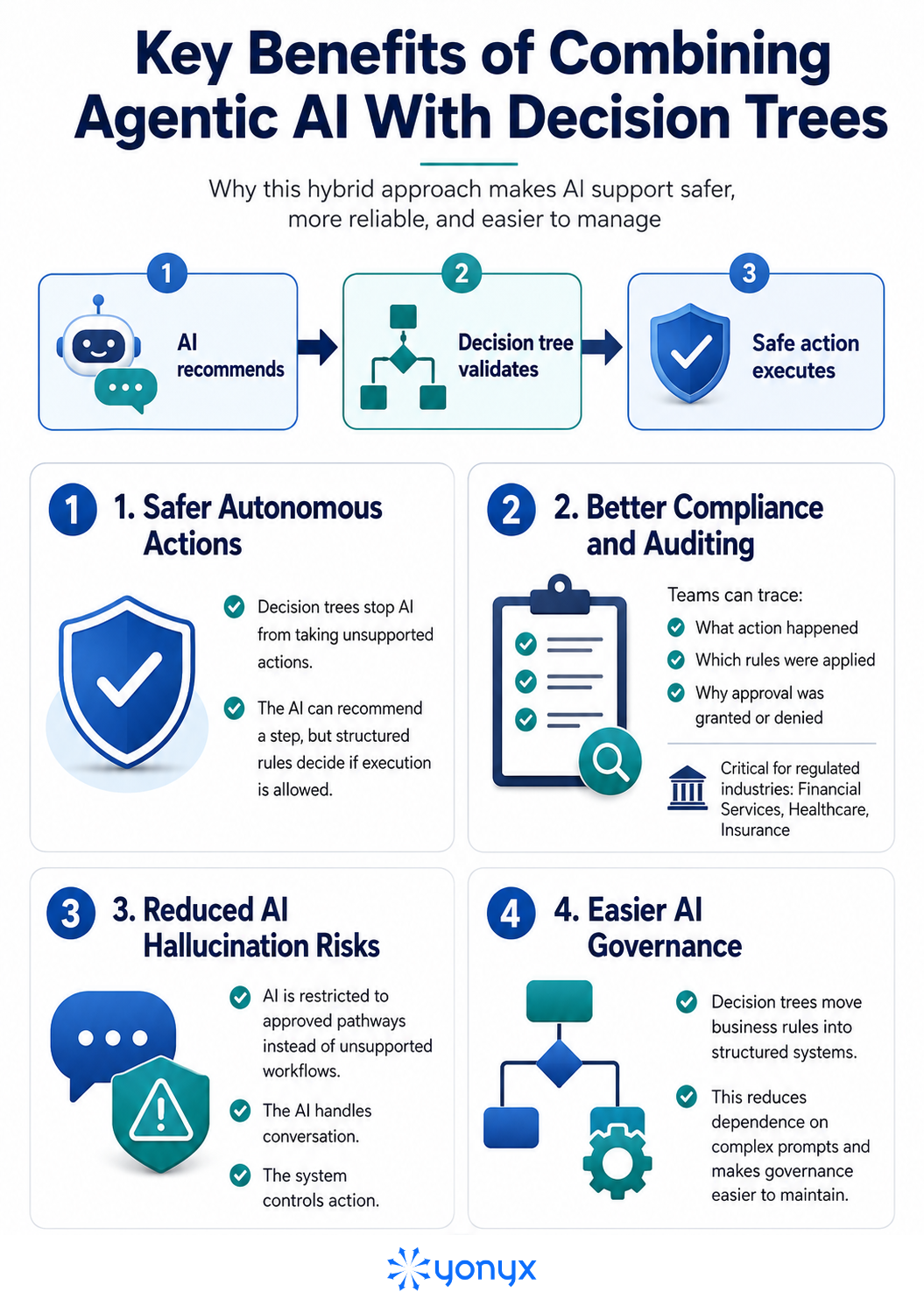
Key Benefits of Combining Agentic AI With Decision Trees
Agentic AI provides reasoning and automation, while decision trees add rules, validation, and control. Together, they help organizations automate support workflows while keeping AI actions safe, traceable, and compliant.
Building a Safe Agentic AI Support Workflow
Organizations should approach AI support automation strategically instead of automating everything immediately.
A practical implementation framework includes five steps.
Step 1: Identify Suitable Support Workflows
Start with repetitive, predictable processes.
Good automation candidates:
- Order tracking
- FAQ resolution
- Appointment scheduling
- Ticket classification
- Customer information lookup
Avoid starting with:
- Complex complaints
- Legal decisions
- High-value financial actions
Step 2: Create an AI Action Risk Matrix
Before deployment, classify every AI action.
Example:
| Action | Risk Category | Control Needed |
| Answer product questions | Low | Knowledge verification |
| Update customer details | Medium | Identity validation |
| Process refund | High | Approval workflow |
This creates clear boundaries for AI autonomy.
Step 3: Connect AI With Trusted Data Sources
Agentic AI is only as reliable as the information it can access.
Organizations should connect AI agents with:
- Verified knowledge bases
- CRM systems
- Customer databases
- Order management platforms
A strong knowledge foundation improves:
- Accuracy
- Context understanding
- Customer personalization
Step 4: Define Escalation Rules
A successful AI support system needs clear handoff criteria.
Examples:
Escalate when:
- AI confidence is low
- Customer requests exceptions
- Security verification fails
- Customer expresses frustration
The handoff should include:
- Customer history
- Previous conversation
- AI analysis
- Recommended next steps
This prevents customers from repeating their issues.
Step 5: Monitor Performance and Improve
Businesses should continuously measure:
Customer Metrics
- Customer satisfaction score (CSAT)
- First-contact resolution rate
- Resolution time
AI Performance Metrics
- Automation success rate
- Escalation accuracy
- Failed workflow attempts
Business Metrics
- Agent productivity
- Support cost reduction
- Customer retention
Popular Platforms Supporting Agentic AI in Customer Service
Several enterprise platforms are adding agentic AI capabilities to improve customer experience workflows.
Zendesk AI Agents
Zendesk provides AI-powered customer support capabilities that help businesses automate conversations, summarize tickets, and assist human agents.
Common use cases:
- Customer self-service
- Automated responses
- Agent assistance
NICE Agentic AI for Customer Service
NICE focuses on enterprise contact center automation.
Capabilities include:
- Intelligent customer interactions
- Workflow automation
- Contact center optimization
Kore.ai Experience Platform
Kore.ai provides enterprise conversational AI capabilities focused on:
- Voice automation
- Customer self-service
- Intelligent routing
Coveo AI
Coveo focuses on enterprise search and retrieval-based AI.
Its approach emphasizes:
- Permission-aware information retrieval
- Enterprise knowledge access
- Accurate AI responses
Twilio Customer Engagement
Twilio supports omnichannel customer communication through:
- SMS
- Voice
- Messaging channels
- Customer engagement workflows
Best Practices for Deploying Agentic AI in Support
Successful implementations usually follow these principles:
1. Start With Controlled Autonomy
Do not begin with unrestricted AI actions.
Start with:
- Recommendations
- Agent assistance
- Low-risk automation
Expand autonomy gradually.
2. Keep Business Rules Outside the AI Model
Critical policies should not depend only on prompts.
Use:
- Decision trees
- APIs
- Validation layers
for important controls.
3. Use Human Oversight Strategically
Human approval should focus on:
- High-impact decisions
- Exceptions
- Complex cases
Not routine requests.
4. Maintain a Strong Knowledge Base
A reliable knowledge foundation improves AI performance.
Poor data quality leads to:
- Incorrect answers
- Poor recommendations
- Customer frustration
Final Takeaway
Agentic AI is changing customer support from automated conversations to automated resolution.
But true enterprise adoption requires more than giving AI the ability to act.
The strongest systems combine:
- AI reasoning for flexibility
- Decision trees for control
- Trusted data for accuracy
- Human oversight for critical decisions
This balance allows organizations to deliver faster customer experiences while maintaining the safety and reliability customers expect.
FAQs on Agentic AI for Support
What is Agentic AI in customer support?
Agentic AI in customer support uses autonomous AI systems that understand customer requests, reason through problems, access business tools, and complete workflows with minimal human intervention.
How is Agentic AI different from traditional chatbots?
Traditional chatbots follow predefined scripts and provide information. Agentic AI systems understand context, make decisions, use connected systems, and execute tasks to resolve customer issues.
Is Agentic AI safe for customer service?
Agentic AI is safest when combined with decision trees, access controls, validation rules, and human approval workflows for high-risk actions.
Why are decision trees important for AI support systems?
Decision trees provide structured rules that control AI actions, validate information, enforce policies, and prevent unsafe automation.
Can Agentic AI replace customer support agents?
Agentic AI can automate repetitive workflows but works best alongside human agents who handle complex problems, exceptions, and relationship-driven conversations.